 United States
Network Module Catalyst 3750
Engineered for optimal performance and security, the Cisco Catalyst 3750 Network Module streamlines enterprise connectivity while ensuring reliable, scalable, and efficient networking solutions for critical infrastructure.
Talk to an expert
1 Matching results
- BEST SELLING
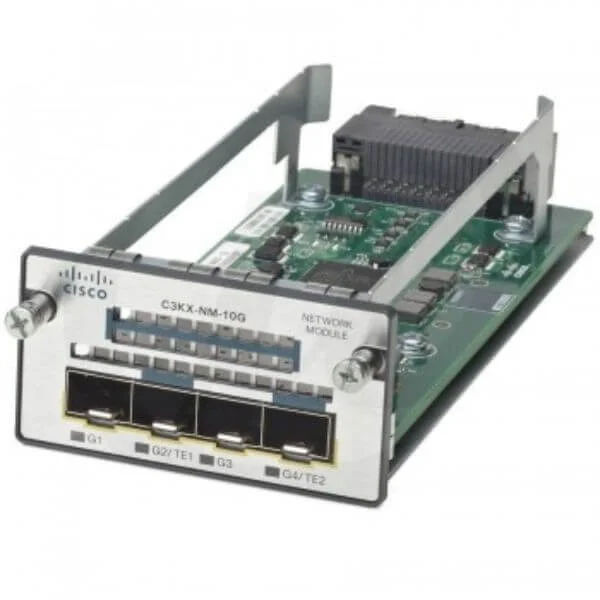
C3KX-NM-10G (Catalyst 3K-X 10G Network Module option PID)
4.8 (5)- Network Module
- Cisco
- SFP+
- 10Gbps
- SFP+
- TCP/IP
- Modular
Est Value $2,933.79
$50.40
98.3% offIn stockNewRefurbishedFirst-Time Buyer Discount – Get up to 2% additional off on your first order
ORM Rewards Earn $50 in Rewards + Free Expedited Delivery – Join Now!
Use eCoupon ORMSAVE10
eCoupon limited to 5 units

ORM Sales Advisors
Buying for your business? Get a personalised quote in under 2 hours. Talk to an expert
LEARNFilters (1) 
Questions & Answers
What is the Cisco Catalyst 3750 Network Module?
The Cisco Catalyst 3750 Network Module is an optional uplink or service expansion card that provides flexible 1 GbE or 10 GbE connectivity, enhancing the base switch’s port density and uplink performance.
Which network modules are compatible with the Cisco Catalyst 3750 switch?
Supported modules include NM-1G, NM-2-10G, NM-4-10G and select WS-X6700 series cards; compatibility requires a valid IOS image and an open module slot on the 3750 chassis.
How do I install a Cisco Catalyst 3750 Network Module?
Power down the switch, align the module with the expansion slot, slide it in until it latches, secure the captive screws, then power on the switch to auto-detect the module.
Can I hot-swap the network module on a Catalyst 3750?
No; Cisco recommends powering off the Catalyst 3750 before installing or removing a network module to prevent data-plane interruptions and hardware damage.
What uplink speeds are supported by Catalyst 3750 network modules?
Available uplink options include 1 GbE on NM-1G, dual-10 GbE on NM-2-10G and quad-10 GbE on NM-4-10G modules, enabling flexible bandwidth scaling.
Do Cisco 3750 network modules support SFP or SFP+ transceivers?
Yes; 1 GbE modules support Cisco SFPs (SX, LX, ZX, LRM) and 10 GbE modules accept Cisco SFP+ optics for multimode or single-mode links.
How do I upgrade the uplink module on a Catalyst 3750 switch?
Remove the existing module after powering down, insert the new module, then update the IOS image to a version that supports the new hardware and reboot.
What is the maximum throughput of the Catalyst 3750 network modules?
The backplane supports up to 32 Gbps per slot; individual module throughput varies—1 GbE modules deliver 2 Gbps aggregate, while 10 GbE modules deliver 40 Gbps aggregate.
Are PoE capabilities affected by adding a network module?
No; network modules operate independently of PoE power budgets, so PoE+ and PoE++ on access ports remain fully available.
Do I need a special license for Cisco 3750 network modules?
No hardware license is required, but advanced feature sets (IP services, Security) may require corresponding IOS licenses already supported on the 3750.
How do I verify the network module installation on Catalyst 3750?
Use CLI commands such as show module, show inventory and show version to confirm module model, serial number and operational status.
Can I stack Catalyst 3750 switches with different network modules?
Yes; mixed-module stacks operate normally, though Cisco recommends identical modules for predictable uplink performance and uniform feature support.
What are the power requirements for Cisco 3750 network modules?
Modules draw under 15 W each from the switch midplane; no external power supply is needed beyond the Catalyst 3750 chassis PSU.
How do I troubleshoot a failed network module on Catalyst 3750?
Check system logs (show logging), reseat the module, verify IOS support, replace transceivers, and if needed resequence power or swap modules to isolate faults.
Which Cisco IOS versions support the Catalyst 3750 network modules?
Recommended releases are IOS 12.2(55)SE and later or IOS 15.0(2)SE and above, which include full feature and hardware support for all NM-X modules.
How many network modules can I install in a single Catalyst 3750 switch?
Each Catalyst 3750 chassis supports one network module per switch in its dedicated expansion slot; ensure you select the correct slot for your model series.