 United States
Cisco Router 10000 Power Supplies
Engineered for superior networking, Cisco Router 10000 Series Power Supplies deliver robust performance, ensuring secure connectivity, high throughput, and optimized efficiency for enterprise-grade communications.
Talk to an expert
3 Matching results
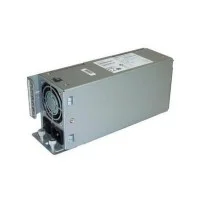
ESR-PWR-AC (AC power entry module for ESR10008)
4.4 (5)- Power Supply
- Cisco
- 600W
- Gaming
- ATX
- Semi-Modular
- Gold
Est Value $3,000.00
$1,149.12
61.7% offIn stockNewRefurbishedFirst-Time Buyer Discount – Get up to 2% additional off on your first order
ORM Rewards Earn $50 in Rewards + Free Expedited Delivery – Join Now!
Use eCoupon ORMSAVE10
eCoupon limited to 5 units
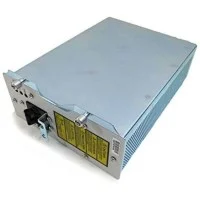
ESR-PWR-DC (DC POWER ENTRY MODULE FOR ESR10008)
4.8 (8)- Power Supply
- Cisco
- 650W
- Gaming / Workstation / Enterprise Server
- ATX
- Semi-Modular
- Gold
Est Value $1,553.00$233.06
85% offIn stockNewRefurbishedFirst-Time Buyer Discount – Get up to 2% additional off on your first order
ORM Rewards Earn $50 in Rewards + Free Expedited Delivery – Join Now!
Use eCoupon ORMSAVE10
eCoupon limited to 5 units
ESR-PWR-COVER (COVER FOR POWER SUPPLY SLOT FOR ESR10008)
4.8 (6)- Power Supply
- Cisco
- 850W
- Gaming
- ATX
- Modular
- Gold
Est Value $40.00$21.00
47.5% offIn stockNewFirst-Time Buyer Discount – Get up to 2% additional off on your first order
ORM Rewards Earn $50 in Rewards + Free Expedited Delivery – Join Now!
Use eCoupon ORMSAVE10
eCoupon limited to 5 units

ORM Sales Advisors
Buying for your business? Get a personalised quote in under 2 hours. Talk to an expert
LEARNFilters (3) 
Questions & Answers
What power modules are supported by Cisco Router 10000 Series Power Supplies?
Cisco Router 10000 Series supports Redundant Power Supply (RPS) modules: PWR-10000-AC-RPS for AC power and PWR-10000-DC-RPS for DC power, ensuring compatibility and high availability.
How do I install a Cisco Router 10000 Series Power Supply?
Power off the router, slide the matching power supply module into an empty chassis slot until it clicks, secure the captive screws, then reconnect AC or DC cables and power on the router.
Can I hot-swap Cisco Router 10000 Series Power Supplies?
Yes, Cisco Router 10000 Series Power Supplies are fully hot-swappable, allowing live removal and insertion without disrupting data traffic when redundancy is configured.
How do I replace a failed Cisco Router 10000 Series Power Supply?
Remove the defective module by loosening its screws, extract it, insert the replacement, tighten screws, and reconnect power cables; the router will auto-detect the new supply.
What is the power capacity of Cisco Router 10000 Series Power Supplies?
Each Cisco 10000 Series power supply delivers up to 3 500 W of output power, supporting high-density line cards and ensuring sufficient power headroom.
How many power supplies can I install for redundancy?
Cisco Router 10000 Series supports up to four power supplies in a single chassis for N+1 or N+N redundancy, maximizing uptime and power resilience.
Which Cisco 10000 Series Power Supply part numbers should I order?
Order PWR-10000-AC-RPS for AC configurations or PWR-10000-DC-RPS for DC. For spare modules, use SMARTNET part numbers: SPA-10000-AC-RPS or SPA-10000-DC-RPS.
How do I verify Cisco Router 10000 Series Power Supply status?
Check the front-panel LED: green indicates normal operation, amber signals a fault; verify in CLI with 'show environment power' for detailed status.
What are the environmental requirements for Cisco 10000 Series Power Supplies?
Operate between 0 °C and 40 °C (32 °F–104 °F) with 5%–85% non-condensing humidity. Ensure proper airflow—front to back—per CLS standards.
Can I mix AC and DC power supplies in one chassis?
No. Cisco Router 10000 Series requires uniform power types—either all AC or all DC modules—to maintain voltage consistency and ensure redundancy.
How do I troubleshoot a failing Cisco 10000 Series Power Supply?
Check LEDs, verify input voltage, inspect cables and circuit breakers. Use 'show logging' for error messages and replace any module reporting a critical fault.
What is the warranty coverage for Cisco Router 10000 Series Power Supplies?
Cisco provides a limited lifetime warranty on the chassis and power supplies for as long as they are installed in the original chassis, with service replacement.
How energy efficient are Cisco Router 10000 Series Power Supplies?
Cisco 10000 Series PSUs comply with 80 PLUS Platinum efficiency, reducing energy waste and lowering operating costs through up to 94% power conversion efficiency.
How do I update firmware for Cisco 10000 Series Power Supplies?
Power supply firmware is updated automatically through the Route Processor IOS-XR image. Ensure your router runs the latest software release for up-to-date PSU firmware.
What safety precautions should I follow when handling Cisco 10000 Series Power Supplies?
Disconnect all power sources before servicing, wear ESD protection, avoid obstructions in airflow vents, and follow all Cisco Installation Notes for safe handling.
How should I recycle or dispose of Cisco 10000 Series Power Supplies?
Dispose of power supplies per local e-waste regulations. Cisco’s sustainability program accepts end-of-life hardware for recycling—visit cisco.com/go/sustainability.