 United States
Cisco Racks Enterprise Infrastructure
Optimize your data center with advanced Cisco rack solutions engineered for reliability, scalability, and security. Our cutting-edge designs empower businesses to streamline operations and drive unprecedented IT performance.
Talk to an expert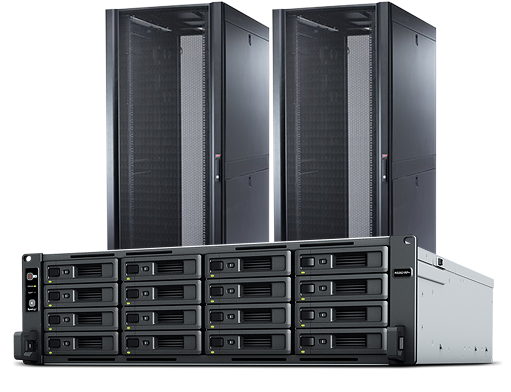
1 Matching results
N7K-CLK-BLANK (Nexus 7000 Network Clock Module Blank)
4.2 (5)- Rack
- Cisco
- Enclosed Cabinet
- Floor Standing
- 42U
- Data Center / Networking Closet / Telecom
- 19-inch
Est Value $240.88
$120.44
50% offIn stockRefurbishedFirst-Time Buyer Discount – Get up to 2% additional off on your first order
ORM Rewards Earn $50 in Rewards + Free Expedited Delivery – Join Now!
Use eCoupon ORMSAVE10
eCoupon limited to 5 units

ORM Sales Advisors
Buying for your business? Get a personalised quote in under 2 hours. Talk to an expert
LEARNFilters (1) 
Questions & Answers
What are Cisco Racks and what applications do they serve?
Cisco Racks are modular, industry-standard enclosures designed to house network, compute and storage equipment. They serve data centers, enterprise wiring closets and branch offices by providing secure, organized and scalable infrastructure for Cisco and third-party hardware.
How do I choose the right Cisco Rack size for my installation?
To select the correct Cisco Rack, assess your equipment’s rack-unit (RU) requirements, depth (standard 600-1070 mm), airflow needs and future expansion. Match equipment height (in U units), depth and cable-management allowances to your workspace and performance goals.
What weight capacity can Cisco Racks support?
Cisco Racks support static loads up to 2,500 kg (5,512 lb) and dynamic loads up to 1,000 kg (2,204 lb), depending on model. Always consult the specific rack’s datasheet to confirm load ratings and ensure proper leveling and anchoring.
How does cable management work in Cisco Racks?
Cisco Racks include integrated cable-management accessories such as vertical and horizontal cable managers, finger ducts and brush panels. These components optimize airflow, reduce signal interference and simplify maintenance by guiding cables along designated pathways.
What power distribution options are available for Cisco Racks?
Cisco Racks support a variety of power distribution units (PDUs), including Basic, Switched and Metered Rack PDUs. These options offer single- and three-phase power, remote monitoring, outlets in multiple configurations and built-in surge protection.
How do Cisco Racks enhance cooling and airflow?
Cisco Racks feature perforated doors, blanking panels and optional fans to optimize front-to-rear airflow. They are compatible with hot-aisle/cold-aisle containment and support aisle containment accessories to maintain consistent temperatures and prevent hotspots.
Are Cisco Racks compatible with third-party equipment?
Yes. Cisco Racks adhere to EIA-310-D standards (19-inch mounting) and support most industry equipment. Adjustable mounting rails accommodate server depths from 600 mm to 1,070 mm, ensuring seamless integration of Cisco and third-party devices.
What security features do Cisco Racks offer?
Cisco Racks provide front and rear locking doors, side panels with tamper-proof screws and optional access-control kits. Accessories like key-card readers and electronic locks add layers of physical security to protect critical infrastructure.
How do I install a Cisco Rack in my data center?
Installation includes anchoring the rack to the floor or pedestal rails, mounting adjustable vertical rails to match equipment depth, installing cable management and PDUs, and then sliding in servers. Always follow Cisco’s step-by-step rack installation guide and local building codes.
Can Cisco Racks support high-density server deployments?
Yes. Cisco offers high-density rack designs with reinforced frames, enhanced cable management and optimized airflow. Combined with specialized PDUs and in-rack cooling modules, these racks accommodate blade servers, modular switches and virtualization clusters.
What maintenance is required for Cisco Racks?
Regular maintenance includes cleaning dust filters, verifying airflow paths, inspecting cable-labeling, checking PDU load readings and tightening mounting hardware. Periodic audits prevent overheating, cable strain and power imbalances in your Cisco Rack.
Which accessories are available for Cisco Racks?
Cisco Rack accessories include sliding rails, shelves, cable managers, blanking panels, cable ties, PDUs, fan trays and environmental sensors. These tools streamline equipment support, airflow management and real-time monitoring.
What environmental monitoring options exist for Cisco Racks?
Cisco offers in-rack temperature and humidity sensors, door-contact switches and leak-detection modules. These integrate with Cisco’s data center network management tools to alert on threshold breaches and ensure optimal operating conditions.
How long is the warranty on Cisco Racks?
Cisco Racks come with a limited lifetime warranty on the frame and a one-year warranty on accessories. Coverage includes defects in materials and workmanship. Extended support is available through Cisco Smart Net Total Care.
How do I order Cisco Racks and get technical support?
Order Cisco Racks through authorized Cisco partners or the Cisco Commerce Workspace. For configuration and installation assistance, contact Cisco Technical Support or use the Cisco Support Community, available 24/7 for rapid resolution.