 United States
Ethernet Switches Juniper EX3300 Series
Experience unmatched network performance with Juniper Ex3300 Series Ethernet switches engineered for scalability, robust security, and effortless management—empowering your business with optimized connectivity and exceptional reliability.
Talk to an expert
1 Matching results
- BEST SELLING
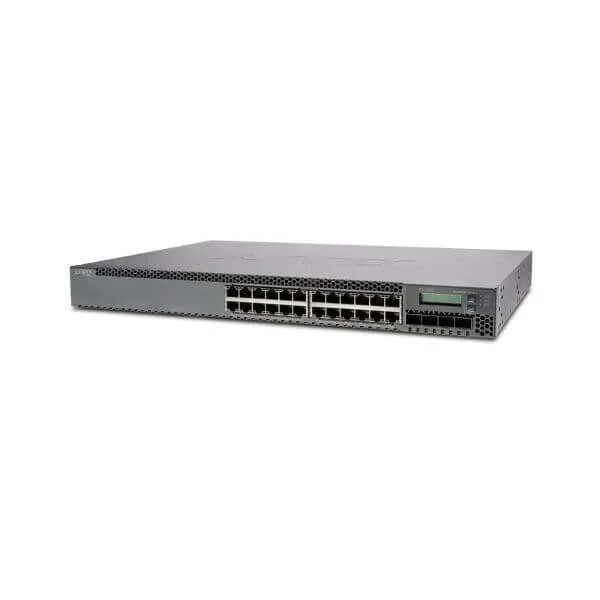
EX3300-24T (EX3300. 24-PORT 10/100/1000BASET)
5 (5)- Switch
- Juniper
- AC Power Supply
- Layer 2 / Layer 3
- Rack-mount
- 26 W
- 12–24 Ports
Est Value $3,237.00
$181.34
94.4% offIn stockNewRefurbishedFirst-Time Buyer Discount – Get up to 2% additional off on your first order
ORM Rewards Earn $50 in Rewards + Free Expedited Delivery – Join Now!
Use eCoupon ORMSAVE10
eCoupon limited to 5 units

ORM Sales Advisors
Buying for your business? Get a personalised quote in under 2 hours. Talk to an expert
LEARNFilters (1) 
Questions & Answers
What is the switching capacity of Juniper EX3300 Series Ethernet Switches?
Juniper EX3300 Series delivers up to 770 Gbps of nonblocking switching capacity per chassis, ensuring wire-speed performance across all ports.
How many and what type of ports are available on the EX3300 switches?
The EX3300 Series offers 24-port and 48-port 10/100/1000BASE-T models, each with four built-in 1GbE/10GbE SFP+ uplinks for flexible network connectivity.
Can EX3300 switches be stacked using Virtual Chassis technology?
Yes, EX3300 switches support Juniper Virtual Chassis, allowing up to 10 units to operate as a single, logically managed device for simplified scaling and resiliency.
What PoE capabilities do EX3300 Series switches offer?
EX3300 switches support IEEE 802.3af/at PoE with a total budget up to 740 W on the 48-port model, powering IP phones, wireless access points, and cameras without external injectors.
Which deployment scenarios are ideal for EX3300 Series switches?
The EX3300 Series is ideal for campus access, branch offices, and small to mid-sized data centers, delivering high availability, scalability, and simplified operations at the network edge.
How are EX3300 switches managed and automated?
Manage EX3300 via Junos OS CLI, J-Web GUI, Juniper Mist Cloud or Junos Space, enabling zero-touch provisioning, policy automation, and real-time telemetry for rapid deployment.
What security features are built into Juniper EX3300 Series?
Built-in security includes 802.1X authentication, MACsec encryption, DHCP snooping, dynamic ARP inspection and scalable ACLs to enforce segmentation and safeguard network integrity.
How does EX3300 Series ensure network redundancy?
EX3300 ensures redundancy through dual internal power supplies (on PoE+ models), Virtual Chassis resiliency, nonstop active routing and support for redundant external power systems.
What is the power consumption and PoE budget of EX3300 switches?
Non-PoE models consume approximately 30 W under typical load; PoE+ models consume up to 190 W plus a 740 W PoE budget on 48-port configurations to power edge devices.
What are the environmental and operating conditions for EX3300?
EX3300 operates in 0 °C to 45 °C ambient temperature and 10 %–85 % non-condensing humidity, meeting NEBS Level 3 and RoHS compliance for diverse deployment environments.
How do I upgrade the firmware on an EX3300 switch?
Upgrade firmware via Junos OS CLI, J-Web GUI or Juniper Network Director by uploading the Junos image and executing the 'request system software add' command with minimal service interruption.
What licensing options are available for Juniper EX3300 Series?
EX3300 includes a base feature set license; optional licenses unlock advanced services such as EVPN, MPLS Layer 3, and high-scale security features for evolving network demands.
How does EX3300 Series compare to the EX4300 Series?
EX3300 provides 770 Gbps switching and standard Virtual Chassis stacking up to 10 units, while EX4300 delivers 1.44 Tbps, supports Virtual Chassis Fabric, and is designed for larger campus fabrics.
What quality of service (QoS) features does EX3300 support?
EX3300 supports eight hardware queues per port, hierarchical scheduling, traffic shaping, strict priority queuing and granular policing to guarantee predictable application performance.
What technical support and warranty does Juniper offer for EX3300?
Juniper provides a limited lifetime hardware warranty for EX3300, plus Juniper Care support options offering 24×7 technical assistance, software updates and rapid hardware replacement.