 United States
Wireless Controllers Ruckus Performance
Offering advanced network management and unparalleled performance, Ruckus Wireless Controllers deliver scalable, secure connectivity and intelligent traffic optimization for enterprise environments, ensuring robust and reliable wireless infrastructure performance.
Talk to an expert
2 Matching results
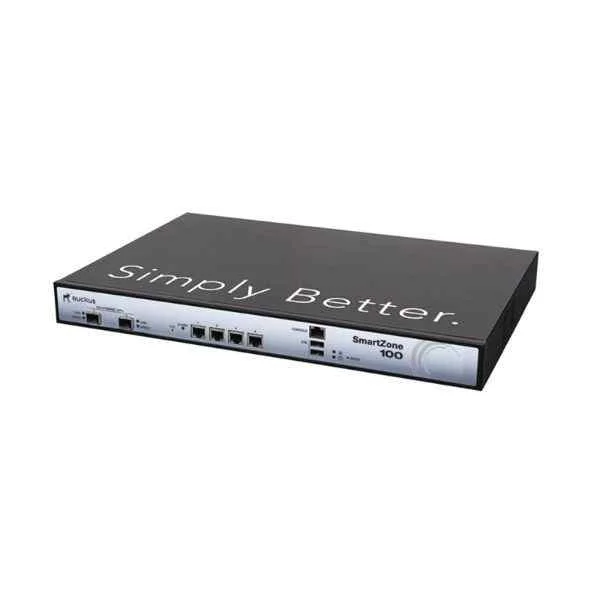
P01-S104-CN00 (SmartZone 100, 4 Gigabit Ethernet interface, 90-day temporary license. The number of basic permanent licenses is 0.)
4.6 (5)- Wireless Access Point
- Ruckus
- Access Point
- Wi-Fi 6
- 2.4GHz / 5GHz
- 2.5Gbps
- 50 meters
Est Value In stock
First-Time Buyer Discount – Get up to 2% additional off on your first order
ORM Rewards Earn $50 in Rewards + Free Expedited Delivery – Join Now!
Use eCoupon ORMSAVE10
eCoupon limited to 5 units
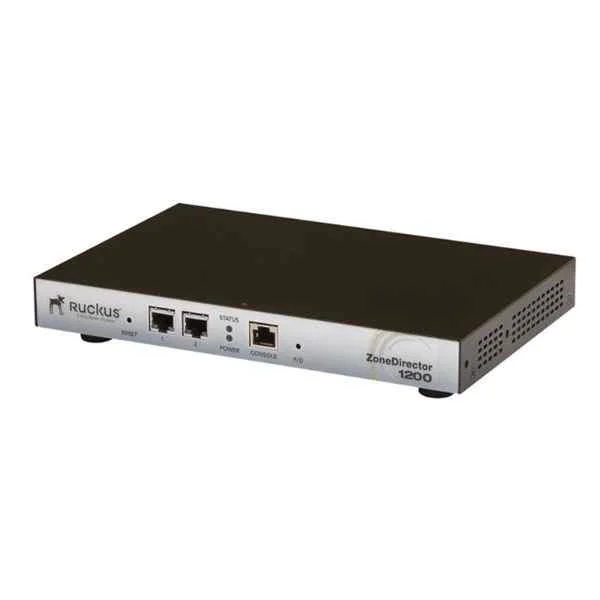
901-1205-CN00 (ZoneDirector 1200 wireless controller with 5 AP management licenses. Support up to 75AP (150 APs after 10.0.X version), 2 10/100/1000Mbps Ethernet interfaces)
4.6 (5)- Wireless Access Point
- Ruckus
- Access Point
- Wi-Fi 6
- 2.4GHz / 5GHz
- 2.5Gbps
- 100 meters
Est Value In stockFirst-Time Buyer Discount – Get up to 2% additional off on your first order
ORM Rewards Earn $50 in Rewards + Free Expedited Delivery – Join Now!
Use eCoupon ORMSAVE10
eCoupon limited to 5 units

ORM Sales Advisors
Buying for your business? Get a personalised quote in under 2 hours. Talk to an expert
LEARNFilters (2) 
Questions & Answers
What is a Ruckus Wireless Controller?
A Ruckus Wireless Controller is a centralized network appliance or virtual instance that manages and optimizes Ruckus access points, streamlines RF management, enforces security policies, and delivers unified WLAN services for enterprise, campus, and branch deployments.
How does a Ruckus Wireless Controller improve Wi-Fi performance?
A Ruckus Wireless Controller leverages BeamFlex+ antenna technology, ChannelFly dynamic channel selection, airtime fairness, and load-balancing algorithms to maximize throughput, minimize interference, and deliver consistent high-density Wi-Fi coverage.
What types of Ruckus Wireless Controllers are available?
Ruckus offers physical controllers (SmartZone, ZoneDirector), virtual controllers (vSmartZone), and cloud-hosted controllers (Ruckus Cloud) to address diverse scale, deployment model, and management requirements.
How scalable are Ruckus Wireless Controllers?
Ruckus Wireless Controllers scale from small branch offices to large campuses—supporting from 10 to over 10,000 access points and 100,000 concurrent clients via clustering and hierarchical multi-tenant architectures.
What security features do Ruckus Wireless Controllers support?
Ruckus Wireless Controllers support WPA3/WPA2-Enterprise, 802.1X/EAP, guest access portals, role-based access control, rogue AP detection, DPI/IDS/IPS, and seamless integration with external RADIUS/LDAP/AD servers.
How do I deploy a Ruckus Wireless Controller in my network?
To deploy, rack and power your controller, connect to your LAN, adopt Ruckus APs via DHCP option 43 or DNS, configure IP pools and SSIDs, and apply RF policies using the web GUI or CLI wizard.
How can I integrate Ruckus Wireless Controllers with cloud management?
You can register your SmartZone or ZoneDirector to Ruckus Cloud for centralized monitoring, configuration backup, firmware management, and multi-site analytics via the Ruckus Cloud portal or API.
What is the difference between Ruckus Unleashed and a Ruckus Wireless Controller?
Ruckus Unleashed is an embedded, controller-less solution for up to 50 APs with zero-touch setup, while Ruckus Controllers provide advanced policy, authentication, multi-tenant, and large-scale management capabilities.
How do I license a Ruckus Wireless Controller?
Licensing is managed through the controller’s license portal or Ruckus Licensing Server; you purchase AP counts, feature bundles (e.g., analytics, hotspot), and apply license keys via the GUI to enable premium services.
How do I upgrade firmware on a Ruckus Wireless Controller?
Download the appropriate firmware from the Ruckus Support portal, access the controller’s Maintenance > Firmware Upgrade page, upload the image, and follow on-screen prompts to schedule or perform an immediate upgrade.
How do I back up and restore a Ruckus Wireless Controller configuration?
In the controller GUI, navigate to Maintenance > Backup & Restore, click Create Backup to download the config file, and use Restore Backup to upload a saved file for rapid recovery or migration.
How can I monitor and analyze network performance on a Ruckus Wireless Controller?
Use built-in dashboards, historical reporting, and real-time charts in the controller GUI or integrate with Ruckus Analytics to view client health, traffic patterns, AP utilization, and custom alerts.
How do Ruckus Wireless Controllers handle high-density environments?
Controllers optimize high-density deployments with dynamic channel allocation, airtime fairness, per-client QoS, load-balancing, and adaptive power control to ensure balanced performance and minimal co-channel interference.
Can I integrate third-party RADIUS with Ruckus Wireless Controllers?
Yes. Ruckus Controllers natively support external RADIUS, TACACS+, LDAP, and Active Directory servers for centralized authentication, authorization, and accounting across multiple SSIDs and user roles.
What are typical use cases for Ruckus Wireless Controllers?
Common use cases include enterprise campuses, higher education, hospitality, healthcare, retail, and public venues where secure, scalable, high-performance Wi-Fi and centralized management are critical.
How do I troubleshoot connectivity issues on a Ruckus Wireless Controller?
Use the controller’s diagnostic tools—ping, traceroute, packet capture, event logs, AP health dashboards, and RF spectrum analytics—to isolate and resolve client or AP connectivity problems.