 United States
Category Hpe Compatible QSFP28 Modules
Upgrade your data center with high-performance Hpe Compatible QSFP28 modules engineered for reliability and efficient connectivity. Achieve seamless integration, enhanced speed and reduced latency for optimal network performance.
Talk to an expert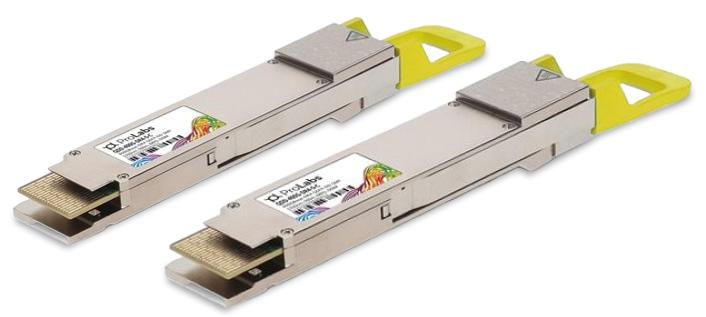
13 Matching results

JL274A-C (100G QSFP28 MPO SR4 100m MM Transceiver HPE X150 Compatible)
4.5 (6)- Transceiver
- Orm
- SFP+
- 10G
- LC
- 850nm
- Short-Range
Est Value In stock
First-Time Buyer Discount – Get up to 2% additional off on your first order
ORM Rewards Earn $50 in Rewards + Free Expedited Delivery – Join Now!
Use eCoupon ORMSAVE10
eCoupon limited to 5 units

JH420A-C (100G QSFP28 MPO PSM4 500m SM Transceiver HPE X150 Compatible)
4.7 (6)- Transceiver
- Orm
- QSFP
- 40G
- LC
- 850 nm
- Short-Range
Est Value In stockFirst-Time Buyer Discount – Get up to 2% additional off on your first order
ORM Rewards Earn $50 in Rewards + Free Expedited Delivery – Join Now!
Use eCoupon ORMSAVE10
eCoupon limited to 5 units

JL275A-C (100G QSFP28 LC LR4 10km SM Transceiver HPE X150 Compatible)
4.7 (6)- Transceiver
- Orm
- SFP+
- 10G
- LC
- 850 nm
- Short-Range
Est Value In stockFirst-Time Buyer Discount – Get up to 2% additional off on your first order
ORM Rewards Earn $50 in Rewards + Free Expedited Delivery – Join Now!
Use eCoupon ORMSAVE10
eCoupon limited to 5 units

JH626A-C (100G QSFP28 SR4 HP Arista Compatible)
4.7 (6)- Transceiver
- Orm
- SFP
- 10G
- LC
- 850nm
- Short-Range
Est Value In stockFirst-Time Buyer Discount – Get up to 2% additional off on your first order
ORM Rewards Earn $50 in Rewards + Free Expedited Delivery – Join Now!
Use eCoupon ORMSAVE10
eCoupon limited to 5 units

JQ028A-C (100G QSFP28 PSM4 SM Transceiver HP Arista Compatible)
4.8 (6)- Transceiver
- Orm
- SFP+
- 10G
- LC
- 1310nm
- Short-Range
Est Value In stockFirst-Time Buyer Discount – Get up to 2% additional off on your first order
ORM Rewards Earn $50 in Rewards + Free Expedited Delivery – Join Now!
Use eCoupon ORMSAVE10
eCoupon limited to 5 units

JH888A-C (100G QSFP28 CWDM4 2km SM Transceiver HP Arista Compatible)
4.7 (6)- Transceiver
- Orm
- SFP
- 10G
- LC
- 850 nm
- Short-Range
Est Value In stockFirst-Time Buyer Discount – Get up to 2% additional off on your first order
ORM Rewards Earn $50 in Rewards + Free Expedited Delivery – Join Now!
Use eCoupon ORMSAVE10
eCoupon limited to 5 units

JH624A-C (100G QSFP28 WDM2 HP Arista Compatible)
4.8 (6)- Transceiver
- Orm
- QSFP+
- 40G
- LC
- 1310nm
- Long-Range
Est Value In stockFirst-Time Buyer Discount – Get up to 2% additional off on your first order
ORM Rewards Earn $50 in Rewards + Free Expedited Delivery – Join Now!
Use eCoupon ORMSAVE10
eCoupon limited to 5 units

JH625A-C (100G QSFP28 LR4 HP Arista Compatible)
4.8 (6)- Transceiver
- Orm
- SFP+
- 10G
- LC
- 850 nm
- Short-Range
Est Value In stockFirst-Time Buyer Discount – Get up to 2% additional off on your first order
ORM Rewards Earn $50 in Rewards + Free Expedited Delivery – Join Now!
Use eCoupon ORMSAVE10
eCoupon limited to 5 units

845966-B21-C (100Gb QSFP28 MPO SR4 100m Transceiver HPE Compatible)
4.8 (6)- Transceiver
- Orm
- SFP+
- 10G
- LC
- 850nm
- Short-Range
Est Value In stockFirst-Time Buyer Discount – Get up to 2% additional off on your first order
ORM Rewards Earn $50 in Rewards + Free Expedited Delivery – Join Now!
Use eCoupon ORMSAVE10
eCoupon limited to 5 units

P18414-B21-C (100Gb QSFP28 MPO SR4 100m FIO Transceiver HPE DX Compatible)
4.7 (6)- Transceiver
- Orm
- SFP
- 10G
- LC
- 850nm
- Short-Range
Est Value In stockFirst-Time Buyer Discount – Get up to 2% additional off on your first order
ORM Rewards Earn $50 in Rewards + Free Expedited Delivery – Join Now!
Use eCoupon ORMSAVE10
eCoupon limited to 5 units

Q2F19A-C (100GbE QSFP28 SR4 100m Transceiver HPE M-Series Compatible)
4.8 (6)- Transceiver
- Orm
- SFP+
- 10G
- LC
- 850 nm
- Short-Range
Est Value In stockFirst-Time Buyer Discount – Get up to 2% additional off on your first order
ORM Rewards Earn $50 in Rewards + Free Expedited Delivery – Join Now!
Use eCoupon ORMSAVE10
eCoupon limited to 5 units

Q2F20A-C (100GbE QSFP28 PSM4 2km Transceiver HPE M-Series Compatible)
4.8 (6)- Transceiver
- Orm
- QSFP
- 40G
- LC
- 850 nm
- Short-Range
Est Value In stockFirst-Time Buyer Discount – Get up to 2% additional off on your first order
ORM Rewards Earn $50 in Rewards + Free Expedited Delivery – Join Now!
Use eCoupon ORMSAVE10
eCoupon limited to 5 units

Q8J73A-C (100GbE QSFP28 1310nm PSM4 500m Transceiver HPE M-Series Compatible)
4.7 (6)- Transceiver
- Orm
- QSFP
- 100G
- LC
- 1310 nm
- Long-Range
Est Value In stockFirst-Time Buyer Discount – Get up to 2% additional off on your first order
ORM Rewards Earn $50 in Rewards + Free Expedited Delivery – Join Now!
Use eCoupon ORMSAVE10
eCoupon limited to 5 units

ORM Sales Advisors
Buying for your business? Get a personalised quote in under 2 hours. Talk to an expert
LEARNFilters (13) 
Questions & Answers
What is an HPE compatible QSFP28 transceiver?
An HPE compatible QSFP28 transceiver is a third-party 100 Gb/s optical or DAC module designed to interoperate seamlessly with HPE switches, routers and NICs while meeting HPE’s hardware specifications and firmware requirements.
Which HPE switches support QSFP28 modules?
HPE ProCurve, Aruba CX and HPE FlexNetwork series switches with 100 Gb/s uplink or line-card slots support QSFP28 modules; always verify compatibility in the HPE Quick Specs for your specific switch model.
What data rates does QSFP28 support?
QSFP28 supports four lanes at 25 Gb/s each, delivering an aggregate 100 Gb/s data rate, making it ideal for high-performance computing, hyperscale data centers and enterprise backbone links.
Which fiber and distance options are available for HPE compatible QSFP28?
Common options include 100GBASE-SR4 for multimode up to 100 m, 100GBASE-LR4 for single-mode up to 10 km, 100GBASE-ER4 up to 40 km and 100GBASE-DR4 up to 500 m over parallel single-mode fiber.
What types of direct attach copper (DAC) cables work with QSFP28?
Passive and active QSFP28 DAC cables are available in lengths from 1 m to 7 m; passive is cost-effective for short runs, while active DAC extends reach up to 10 m with lower power consumption.
Can I mix HPE compatible QSFP28 modules with other vendors’ optics?
Yes, if both modules adhere strictly to the QSFP28 MSA specification and HPE firmware requirements, they can co-exist, but for guaranteed support use parts validated for HPE equipment.
How do I choose the correct QSFP28 part number?
Match your required speed, fiber type, distance and module style against HPE’s compatibility matrix; reference OEM part numbers and cross-reference with the third-party supplier’s equivalent code.
What is the typical power consumption of a QSFP28 transceiver?
Power consumption ranges from 3.5 W for SR4 modules to 4.5 W for LR4/ER4 modules; DAC cables consume under 1 W, supporting dense, low-power data center deployments.
How do I install a QSFP28 in an HPE switch?
Ensure the switch is powered on, align the QSFP28 module with the port opening, gently insert until it clicks, then verify link lights and run a port-status check in the CLI or web interface.
Are HPE compatible QSFP28 modules hot-swappable?
Yes, QSFP28 modules are hot-swappable, allowing insertion or removal without powering down the system; always confirm link traffic has migrated before removal for minimal disruption.
How do I verify QSFP28 link status on HPE equipment?
Use the HPE CLI command show interfaces or view the port status in the web GUI; active optics display ‘up’ state and report lane-by-lane diagnostics such as temperature and voltage.
Do HPE compatible QSFP28 modules support Digital Optical Monitoring (DOM)?
Yes, most HPE-validated QSFP28 transceivers support DOM, providing real-time monitoring of optical power, temperature, voltage and bias current via SFF-8636 registers.
What warranty and support come with third-party QSFP28 modules?
Leading vendors offer lifetime warranty, 24/7 RMA service and HPE compatibility guarantee; always check the supplier’s policy for coverage details and response times.
What are common troubleshooting steps for QSFP28 issues?
Verify optical end-face cleanliness, check cable pin-outs, confirm firmware compatibility, replace transceiver or cable to isolate faults, and review switch logs for SFP+ errors or alarms.
What are the benefits of using HPE compatible QSFP28 over OEM optics?
Third-party QSFP28 offers up to 40% cost savings, strict HPE compliance, immediate availability, and equivalent performance and reliability under warranty and interoperability tested by the vendor.
How do I select the best QSFP28 module for my data center?
Assess your network’s speed, distance, fiber type and power budget, consult HPE’s compatibility matrix, compare module specifications and choose a vendor with proven HPE validation and support.