 United States
Networking Modules Juniper Compatible Xenpak
Experience high-performance interoperability and reliable connectivity with our Juniper Compatible Xenpak solution, engineered for precision and efficiency to ensure optimal network performance under demanding conditions.
Talk to an expert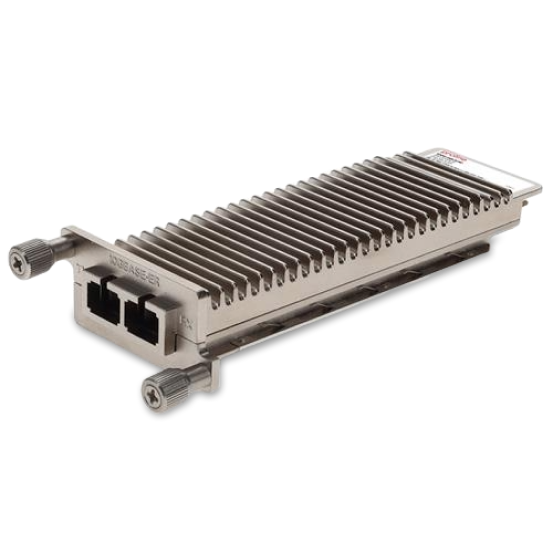
2 Matching results

XENPAK-1XGE-SR-C (XENPAK 10GBase-SR Pluggable Juniper Compatible)
4.7 (7)- Transceiver
- Orm
- XENPAK
- 10G
- LC
- 850nm
- Short-Range
Est Value In stock
First-Time Buyer Discount – Get up to 2% additional off on your first order
ORM Rewards Earn $50 in Rewards + Free Expedited Delivery – Join Now!
Use eCoupon ORMSAVE10
eCoupon limited to 5 units

XENPAK-1XGE-LR-C (XENPAK 10GBase-LR Pluggable, 10KM Juniper Compatible)
4.6 (7)- Transceiver
- Orm
- XENPAK
- 10G
- LC
- 1310 nm
- Long-Range
Est Value In stockFirst-Time Buyer Discount – Get up to 2% additional off on your first order
ORM Rewards Earn $50 in Rewards + Free Expedited Delivery – Join Now!
Use eCoupon ORMSAVE10
eCoupon limited to 5 units

ORM Sales Advisors
Buying for your business? Get a personalised quote in under 2 hours. Talk to an expert
LEARNFilters (2) 
Questions & Answers
What is a Juniper Compatible XENPAK module?
A Juniper Compatible XENPAK module is a hot-pluggable 10 Gigabit Ethernet transceiver designed to meet Juniper Networks MSA specifications. It supports multi-mode and single-mode fiber, ensuring seamless integration with Juniper switches and routers.
Which data rates and distances do Juniper Compatible XENPAK modules support?
Juniper Compatible XENPAK modules support 10 Gbps data rates and cover distances from 300 m (multi-mode) up to 80 km (single-mode). Distance varies by wavelength (850 nm, 1310 nm, 1550 nm) and fiber type.
How do I install a Juniper Compatible XENPAK module?
To install, power off the Juniper device, insert the XENPAK module into the port until it clicks, then power on. The switch auto-detects the module; verify status with the ‘show interfaces xe’ command.
Are Juniper Compatible XENPAK modules MSA-compliant?
Yes, they fully comply with the Multi-Source Agreement (MSA) standards for XENPAK, ensuring cross-vendor interoperability and reliable performance in Juniper and other network equipment.
Can I use Juniper Compatible XENPAK with non-Juniper switches?
Yes. Because they adhere to the XENPAK MSA, these modules work with any MSA-compliant 10 GbE port, including Cisco, Brocade and Arista, delivering full functionality.
What wavelengths are available for Juniper Compatible XENPAK?
Available wavelengths include 850 nm for short-reach multi-mode, 1310 nm for single-mode up to 10 km, and 1550 nm for long-reach single-mode up to 80 km. Choose based on distance and fiber type.
How do I verify module compatibility with my Juniper device?
Consult the Juniper hardware compatibility list or use the CLI command ‘show chassis hardware’. Cross-reference the part number (e.g., XPA-10GB-LR) with your switch or router model.
What diagnostics are available for Juniper Compatible XENPAK?
Diagnostic features include Digital Optical Monitoring (DOM) for real-time TX/RX power and temperature readings. Access data via CLI commands such as ‘show interfaces diagnostics optics’.
Are Juniper Compatible XENPAK modules hot-swappable?
Yes. XENPAK modules are hot-swappable, allowing safe insertion and removal without powering down the host device, minimizing network downtime.
How do Juniper Compatible XENPAK and XFP modules differ?
XENPAK modules are larger and support advanced diagnostics like DOM, while XFP are more compact and consume less power. Both deliver 10 Gbps, but package and power specs differ.
What environmental conditions are required for Juniper Compatible XENPAK?
Operating temperature ranges from 0°C to 70°C, storage from –40°C to 85°C, and relative humidity up to 85% (non-condensing). Check module datasheets for detailed specs.
Can I mix Juniper Compatible XENPAK modules with different distances in one chassis?
Yes. Each port negotiates independently. You can deploy a mix of SR, LR, and ER XENPAK modules in the same chassis without conflicts.
What is the warranty on Juniper Compatible XENPAK modules?
Most vendors offer a lifetime or multi-year warranty covering manufacturing defects. Verify warranty duration with your supplier before purchase.
How do I troubleshoot a link down issue with a Juniper Compatible XENPAK?
Check port status via ‘show interfaces xe’ and inspect DOM values for TX/RX power. Verify fiber polarity, clean connectors, and confirm matching wavelength and fiber type.
Where can I purchase authentic Juniper Compatible XENPAK modules?
Authorized network hardware resellers and certified partners stock MSA-compliant XENPAK modules. Always verify vendor reputation and request compliance documentation.
What certifications should I look for when buying Juniper Compatible XENPAK?
Look for CE, FCC, RoHS and MSA compliance. These certifications ensure electromagnetic compatibility, environmental safety and multi-vendor interoperability.