 United States
Access Points D-Link Panel Solutions
Engineered for superior connectivity, D-Link Panel Access Points deliver robust performance, secure data transmission, and seamless integration for scalable enterprise deployments. Experience advanced management, reliability, and enterprise-grade security.
Talk to an expert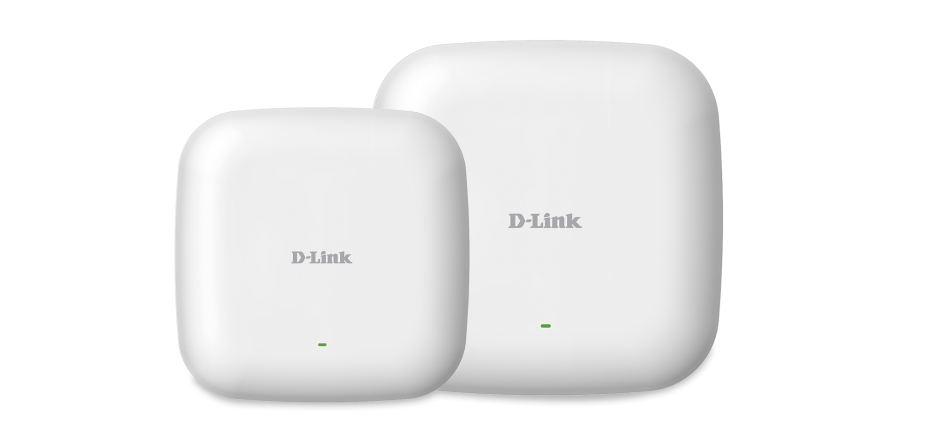

ORM Sales Advisors
Buying for your business? Get a personalised quote in under 2 hours. Talk to an expert
LEARNFilters (0) 
Questions & Answers
What is a D-Link Panel Access Point?
A D-Link Panel Access Point is a high-performance, flat-panel wireless device designed for seamless indoor or outdoor network coverage. It delivers stable Wi-Fi connectivity with advanced MIMO technology and centralized management.
How do I install a D-Link Panel Access Point?
Mount the access point on a flat surface or pole using the included mounting kit, connect it to a PoE switch or injector, and configure settings via the web GUI or D-Link Nuclias Cloud controller.
Does the D-Link Panel Access Point support Power over Ethernet (PoE)?
Yes. All D-Link Panel Access Points support 802.3af/at PoE for both data and power delivery over a single Ethernet cable, simplifying installation and reducing cabling costs.
How do I configure wireless security on a D-Link Panel Access Point?
Log in to the web interface or Nuclias Cloud portal, navigate to Wireless > Security, select WPA2/WPA3 encryption, set a strong passphrase, and apply changes to enable secure access.
What coverage area can I expect from a D-Link Panel Access Point?
A D-Link Panel Access Point typically covers up to 3,000 square feet per unit, depending on environment and antenna orientation. You can extend coverage with additional units in a mesh configuration.
How many SSIDs can a D-Link Panel Access Point broadcast?
Each D-Link Panel Access Point can broadcast up to eight SSIDs per radio band, allowing you to segment networks for guests, employees, and IoT devices with individual security policies.
Can I manage multiple D-Link Panel Access Points centrally?
Yes. Use D-Link Nuclias Cloud or on-premises Nuclias Connect to provision, monitor, and troubleshoot multiple panel access points from a single dashboard with real-time analytics.
How do I update the firmware on my D-Link Panel Access Point?
Download the latest firmware from the D-Link support site or use Nuclias Cloud auto-upgrade. In the web GUI, navigate to Maintenance > Firmware Update, upload the file, and click Update.
Are D-Link Panel Access Points compatible with existing network infrastructure?
Yes. D-Link Panel Access Points integrate seamlessly with standard Ethernet switches, routers, and controllers. They support VLAN tagging, SNMP, and Radius authentication for enterprise networks.
What frequency bands do D-Link Panel Access Points support?
Most D-Link Panel models support dual-band 2.4 GHz and 5 GHz operation simultaneously, featuring 802.11ac Wave 2 or Wi-Fi 6 (802.11ax) for maximum throughput and minimal interference.
How do I optimize Wi-Fi performance on my D-Link Panel Access Point?
Enable band steering, load balancing, and airtime fairness in the wireless settings. Position the panel for line-of-sight coverage, and adjust channel width to reduce co-channel interference.
What environmental conditions can D-Link Panel Access Points withstand?
Indoor models operate between 0°C and 40°C with 10–90% humidity. Outdoor-rated models offer IP55 weatherproof protection and can withstand –20°C to 60°C for versatile deployment.
How do I factory-reset a D-Link Panel Access Point?
Press and hold the reset button on the unit for 10 seconds until the LED blinks. Release to restore factory defaults, then reconfigure network settings via the web interface or Nuclias Cloud.
What troubleshooting steps help resolve connectivity issues?
Verify PoE power, check Ethernet cable integrity, confirm SSID and security settings, review event logs in the web GUI or Nuclias dashboard, and reboot the access point if needed.
Can D-Link Panel Access Points be used in mesh mode?
Yes. Many D-Link Panel Access Points support mesh networking. Enable mesh in the wireless settings to extend coverage without running additional Ethernet cables.
What warranty and technical support are available for D-Link Panel Access Points?
D-Link offers a limited lifetime warranty on hardware and 24/7 technical support via phone, email, and online chat. Extended support plans are available for business customers.