 United States
Outdoor Access Points Ruckus Innovation
Experience unmatched outdoor wireless performance with the Ruckus Outdoor Access Point, expertly engineered for robust connectivity, advanced security, and seamless operation in diverse and challenging environments.
Talk to an expert
2 Matching results
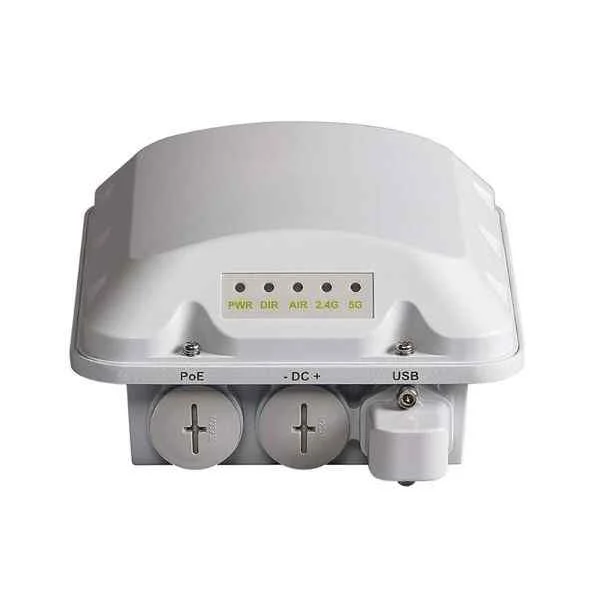
901-T310-WW20 (Ruckus T310c, outdoor AP, omnidirectional, 802.11ac 2x2:2 MU-MIMO Built-in BeamFlex+ smart antenna, dual-band simultaneous maximum 1.2Gbps. An Ethernet 10/100/1000Mbps interface, 802.3af POE power supply. Contains mounting parts. PoE module not included)
4.4 (5)- Wireless Access Point
- Ruckus
- Access Point
- Wi-Fi 6
- 2.4GHz / 5GHz
- 2.5Gbps
- 100 meters
Est Value $791.70
$395.85
50% offIn stockRefurbishedFirst-Time Buyer Discount – Get up to 2% additional off on your first order
ORM Rewards Earn $50 in Rewards + Free Expedited Delivery – Join Now!
Use eCoupon ORMSAVE10
eCoupon limited to 5 units
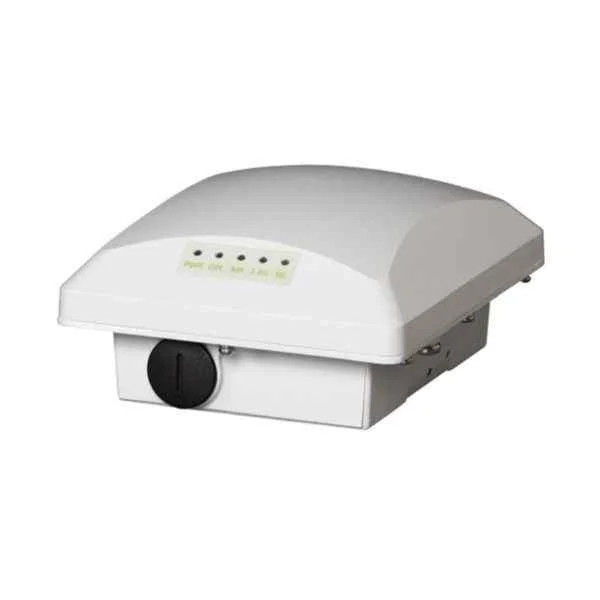
901-T300-WW01 (ZoneFlex T300, outdoor AP, omnidirectional, 802.11ac 2x2:2 built-in BeamFlex+ smart antenna, dual-band simultaneous maximum 1.2Gbps. An Ethernet 10/100/1000Mbps interface, 802.3af POE, including mounting parts. PoE module not included)
4.2 (5)- Wireless Product
- Ruckus
- Access Point
- Wi-Fi 6
- 2.4GHz / 5GHz
- 2.5Gbps
- 150 feet
Est Value $1,727.98$863.99
50% offIn stockRefurbishedFirst-Time Buyer Discount – Get up to 2% additional off on your first order
ORM Rewards Earn $50 in Rewards + Free Expedited Delivery – Join Now!
Use eCoupon ORMSAVE10
eCoupon limited to 5 units

ORM Sales Advisors
Buying for your business? Get a personalised quote in under 2 hours. Talk to an expert
LEARNFilters (2) 
Questions & Answers
What is a Ruckus Outdoor AP?
A Ruckus Outdoor AP is a ruggedized wireless access point engineered to deliver high-performance, reliable Wi-Fi connectivity in outdoor environments.
What are the key benefits of using Ruckus Outdoor AP?
Ruckus Outdoor APs provide extended coverage, high client capacity, adaptive antenna technology, and enterprise-grade security to ensure reliable outdoor Wi-Fi.
How far can a Ruckus Outdoor AP extend wireless coverage?
Depending on model and environment, Ruckus Outdoor APs can deliver strong signal coverage up to 300 meters, using patented BeamFlex® antenna adaptivity to optimize reach.
How durable are Ruckus Outdoor APs against harsh weather?
Ruckus Outdoor APs feature IP67-rated enclosures and industrial-grade components that withstand rain, dust, extreme temperatures, and salt fog for reliable all-weather operation.
Which frequency bands do Ruckus Outdoor APs support?
Ruckus Outdoor APs support dual-band 2.4 GHz and 5 GHz operation, with select models offering tri-band or 802.11ax for advanced performance.
How do I install a Ruckus Outdoor AP?
Ruckus Outdoor APs mount easily on poles or walls using included brackets, and require only Power over Ethernet (802.3af/at) and a CAT5e/6 cable for network connectivity.
What is the best way to configure a Ruckus Outdoor AP for optimal performance?
Configure your Ruckus Outdoor AP via Ruckus SmartZone, ZoneDirector, Unleashed, or Cloud platforms, enabling automatic channel and power optimization along with WPA3 security.
Can Ruckus Outdoor APs be integrated with existing Ruckus controllers?
Yes, Ruckus Outdoor APs seamlessly integrate with Ruckus SmartZone, ZoneDirector, and Ruckus Cloud controllers for unified management and policy enforcement.
What security features are available on Ruckus Outdoor APs?
Ruckus Outdoor APs include WPA2/WPA3 encryption, 802.1X authentication, rogue AP detection, client isolation, and integrated firewall policies for enterprise security.
How can I manage Ruckus Outdoor APs remotely?
Manage Ruckus Outdoor APs remotely using the Ruckus Cloud portal or on-premises SmartZone/ZoneDirector controllers, with real-time monitoring, alerts, and firmware updates.
What power options are supported by Ruckus Outdoor APs?
Ruckus Outdoor APs support 802.3af/at Power over Ethernet as well as proprietary PoE injectors for flexible power delivery in outdoor deployments.
Are Ruckus Outdoor APs suitable for high-density environments?
Yes, Ruckus Outdoor APs employ MU-MIMO, airtime fairness, and BeamFlex+ adaptive antennas to serve a large number of concurrent clients without performance degradation.
What mounting options are available for Ruckus Outdoor APs?
Ruckus Outdoor APs offer versatile mounting kits for pole, wall, rack, and super-pole installations, with secure locking mechanisms and tamper-resistant design.
How do I perform firmware updates on a Ruckus Outdoor AP?
Firmware on Ruckus Outdoor APs can be updated via the Ruckus Cloud, SmartZone/ZoneDirector GUI, or CLI, with scheduled rolling upgrades to minimize service disruption.
How does BeamFlex technology improve outdoor Wi-Fi coverage?
BeamFlex’s patented adaptive antenna patterns continuously adjust signal direction to mitigate interference and extend coverage, delivering optimal throughput to each client.
What technical support options are available for Ruckus Outdoor APs?
Ruckus offers 24/7 technical support, software maintenance, advanced replacement services, and professional deployment assistance through its global support portal.