 United States
Intel RAM High-Performance
Experience unparalleled computing efficiency with Intel RAM, engineered for high-demand systems and optimized for exceptional multitasking, rapid data processing, and reliable, sustained performance.
Talk to an expert
4 Matching results
- BEST SELLING
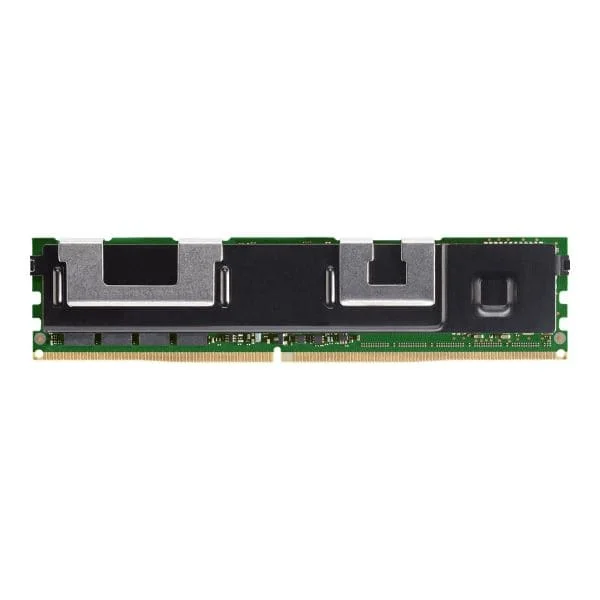
NMA1XXD128GPSU4 (Intel Optane DC Persistent - DDR-T - module - 128 GB - DIMM 288-pin - 2666 MHz / PC4-21300)
4.8 (5)- Computer Memory
- Intel
- DDR4
- 128 GB
- Desktop
- Workstation
- UDIMM
Est Value $1,700.22
$1,451.42
14.6% offIn stockNewRefurbishedFirst-Time Buyer Discount – Get up to 2% additional off on your first order
ORM Rewards Earn $50 in Rewards + Free Expedited Delivery – Join Now!
Use eCoupon ORMSAVE10
eCoupon limited to 5 units
- BEST SELLING
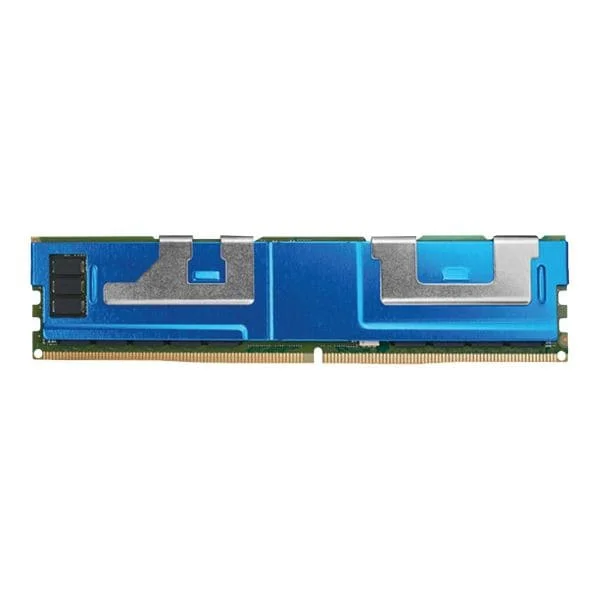
NMA1XXD256GPSU4 (Intel Optane DC Persistent - DDR-T - module - 256 GB - DIMM 288-pin - 2666 MHz / PC4-21300)
4.4 (5)- Computer Memory
- Intel
- DDR4
- 256 GB
- Desktop
- UDIMM
Est Value $5,181.60$4,423.31
14.6% offIn stockRefurbishedFirst-Time Buyer Discount – Get up to 2% additional off on your first order
ORM Rewards Earn $50 in Rewards + Free Expedited Delivery – Join Now!
Use eCoupon ORMSAVE10
eCoupon limited to 5 units
- BEST SELLING
NMA1XXD512GPSU4 (Intel Optane DC Persistent - DDR-T - module - 512 GB - DIMM 288-pin - 2666 MHz / PC4-21300)
5 (5)- Computer Memory
- Intel
- DDR4
- 16 GB
- Desktop
- Workstation
- UDIMM
Est Value $23,848.51$20,358.48
14.6% offIn stockRefurbishedFirst-Time Buyer Discount – Get up to 2% additional off on your first order
ORM Rewards Earn $50 in Rewards + Free Expedited Delivery – Join Now!
Use eCoupon ORMSAVE10
eCoupon limited to 5 units
NMB1XXD128GPSUF (Intel Optane Persistent Memory 200 Series - DDR-T - module - 128 GB - DIMM 288-pin - 2666 MHz / PC4-21300)
4.8 (5)- Computer Memory
- Intel
- DDR4
- 128 GB
- Desktop
- Workstation
- UDIMM
Est Value $3,267.13$2,789.02
14.6% offIn stockRefurbishedFirst-Time Buyer Discount – Get up to 2% additional off on your first order
ORM Rewards Earn $50 in Rewards + Free Expedited Delivery – Join Now!
Use eCoupon ORMSAVE10
eCoupon limited to 5 units

ORM Sales Advisors
Buying for your business? Get a personalised quote in under 2 hours. Talk to an expert
LEARNFilters (4) 
Questions & Answers
What is Intel RAM and why is it important?
Intel RAM refers to system memory modules optimized for Intel processors. It temporarily stores data and instructions, enabling faster access than storage drives. High-performance RAM ensures smooth multitasking, faster application loading, and overall system responsiveness.
Which RAM types are supported by Intel 12th and 13th Gen CPUs?
Intel 12th and 13th Gen Core processors support both DDR4 and DDR5 memory. DDR4 compatibility depends on the motherboard, while DDR5 requires a DDR5-capable board. DDR5 offers higher bandwidth and greater efficiency for demanding workloads.
How do I check which RAM speed is supported by my Intel motherboard?
Refer to your Intel motherboard’s user manual or product specifications on the manufacturer’s website. Look for the supported DDR version (DDR4/DDR5) and maximum JEDEC/XMP frequencies. You can also view supported speeds in the BIOS memory configuration section.
What is Intel XMP and how do I enable it?
Intel Extreme Memory Profile (XMP) is a BIOS feature that automatically applies tested overclocking profiles for DDR4 and DDR5 modules. To enable it, enter BIOS, navigate to the memory or overclocking menu, select XMP, and choose the desired profile. Save and reboot.
Can I run mixed DDR4 and DDR5 RAM on an Intel platform?
No. Intel motherboards are designed for either DDR4 or DDR5, not both. Mixing both types in the same system is not supported and will prevent the system from booting.
How much RAM do I need for an Intel-based gaming PC?
For modern gaming on an Intel platform, 16 GB of DDR4 or DDR5 RAM is the recommended baseline. For high-end gaming, content creation, or streaming, 32 GB ensures smoother multitasking and future-proof performance.
Does Intel support ECC memory on desktop platforms?
ECC (Error-Correcting Code) memory support is available on Intel’s workstation and server chipsets (Xeon processors and select Intel Workstation motherboards). Mainstream Intel Core desktop platforms do not support ECC RAM.
How can I optimize RAM performance on an Intel system?
Enable XMP profiles in BIOS, populate all memory channels for dual- or quad-channel operation, choose modules with low timings and high frequency, and ensure your motherboard BIOS is updated for optimal compatibility.
What is the maximum RAM capacity supported by Intel Core processors?
Intel Core i9, i7, i5, and i3 desktop processors generally support up to 128 GB of DDR4 or DDR5 RAM, depending on the chipset and motherboard. Check your specific CPU and motherboard combination for exact limits.
Why is RAM latency important for Intel CPUs?
Latency (measured in CAS timings) indicates delays in data retrieval. Lower latency improves responsiveness and frame rates in gaming and real-time applications. Balancing high frequency with low timings yields the best performance.
How do I troubleshoot RAM compatibility issues on an Intel system?
Verify module compatibility with your motherboard QVL list, update BIOS to the latest version, test each stick individually in the primary slot, and run memory diagnostics (e.g., MemTest86) to identify faulty modules.
Can I overclock Intel-compatible DDR5 RAM for better performance?
Yes. DDR5 modules with XMP 3.0 support allow user-defined overclocking through BIOS. Enable XMP or manually adjust frequency, voltage, and timings. Ensure adequate cooling and stability testing after adjustments.
How many RAM slots should I populate for optimal Intel platform performance?
Populate all memory channels (two slots for desktop dual-channel or four slots for quad-channel) with matched modules. Using balanced channel configurations maximizes bandwidth and overall system performance.
What should I consider when upgrading RAM on an Intel laptop?
Check your laptop’s maximum supported RAM and memory type (DDR4/DDR5) in the user manual. Purchase SODIMM modules matching speed and voltage, and follow manufacturer guidelines for safe installation to maintain warranty.
Is it better to choose higher frequency or larger capacity RAM for Intel systems?
Balance both. Higher frequency improves bandwidth-sensitive tasks like gaming, while larger capacity benefits multitasking and memory-intensive applications. For most users, 32 GB DDR4-3600 or DDR5-5200 offers an optimal combination.