 United States
Business SIP Phones 7800 Series
Discover the robust 7800 Series SIP Phone engineered for modern enterprises, delivering superior audio clarity, advanced connectivity, and unmatched reliability for seamless, efficient communication solutions.
Talk to an expert
2 Matching results
- BEST SELLING
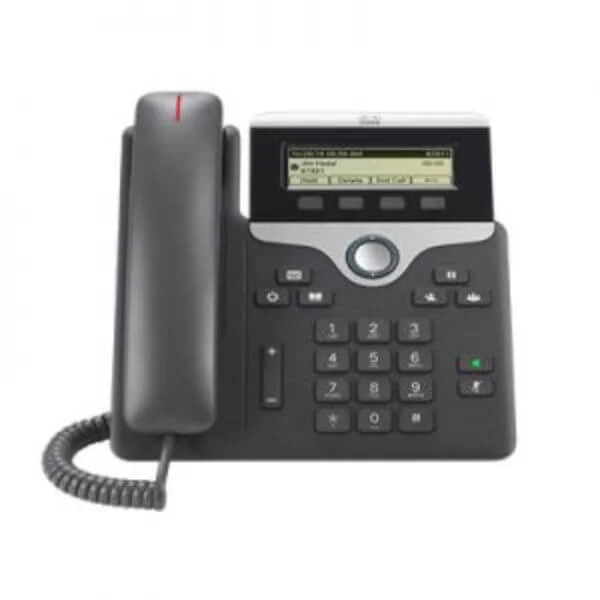
CP-7811-3PCC-K9 (IP PHONE 7811 FOR 3RD PARTY CALL CONTROL)
5 (5)Est Value $231.00
$138.94
39.9% offIn stockNewRefurbishedFirst-Time Buyer Discount – Get up to 2% additional off on your first order
ORM Rewards Earn $50 in Rewards + Free Expedited Delivery – Join Now!
Use eCoupon ORMSAVE10
eCoupon limited to 5 units
- BEST SELLING
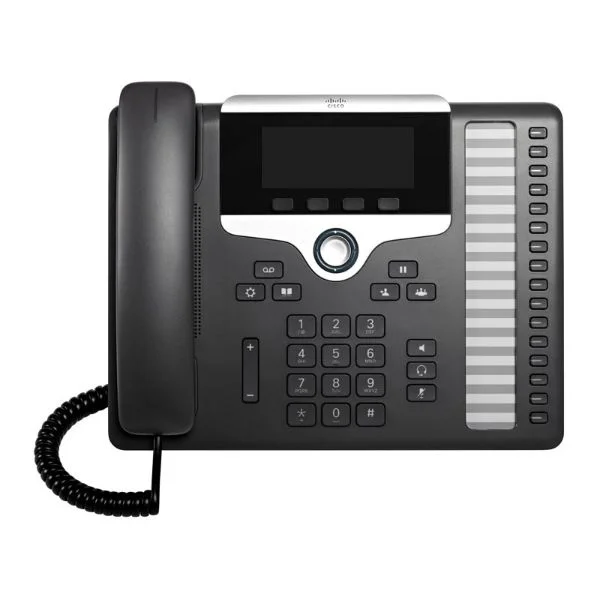
CP-7861-3PCC-K9 (Cisco 7861 SIP Phone)
4.4 (5)Est Value $456.00$261.86
42.6% offIn stockNewRefurbishedFirst-Time Buyer Discount – Get up to 2% additional off on your first order
ORM Rewards Earn $50 in Rewards + Free Expedited Delivery – Join Now!
Use eCoupon ORMSAVE10
eCoupon limited to 5 units

ORM Sales Advisors
Buying for your business? Get a personalised quote in under 2 hours. Talk to an expert
LEARNFilters (2) 
Questions & Answers
What are the key features of the SIP Phone 7800 Series?
The SIP Phone 7800 Series provides HD audio, multi-line support, advanced call handling, PoE compatibility, programmable soft keys and XML-based applications for streamlined business communications.
How do I set up the SIP Phone 7800 Series?
Connect the phone to your LAN, power it via PoE or the included adapter, enter your SIP credentials in the web interface, and reboot for automatic provisioning.
Is the SIP Phone 7800 Series compatible with major VoIP platforms?
Yes, the SIP Phone 7800 Series is fully interoperable with all leading SIP-based PBX systems, hosted VoIP services and open-source platforms.
Does the SIP Phone 7800 Series support Power over Ethernet (PoE)?
Yes, all 7800 models support IEEE 802.3af PoE, eliminating the need for external power adapters and simplifying deployment.
What audio quality does the SIP Phone 7800 Series deliver?
Equipped with wideband audio codecs (G.722 and Opus), the 7800 Series delivers crystal-clear HD voice performance for professional-grade calls.
How many lines and calls can the SIP Phone 7800 Series handle simultaneously?
Depending on the model, the series supports 2 to 16 programmable lines and up to four concurrent calls for maximum flexibility.
Can I use headsets with the SIP Phone 7800 Series?
Yes, the 7800 Series offers both 3.5 mm and USB headset ports with electronic hook switch support for hands-free operation.
Does the SIP Phone 7800 Series support expansion modules?
Yes, select models support up to two SIP Expansion Modules for up to 180 additional programmable keys and BLF functionality.
What security features are built into the SIP Phone 7800 Series?
The 7800 Series includes TLS and SRTP encryption, secure boot, HTTPs provisioning and VLAN support to safeguard voice communications.
How do I update the firmware on my SIP Phone 7800 Series?
Download the latest firmware from the vendor portal, upload it via the phone’s web interface or your provisioning server, then reboot the device.
What network requirements are needed for the SIP Phone 7800 Series?
A 10/100 Mbps Ethernet switch with PoE support is recommended, along with VLAN, QoS and a stable internet connection to ensure optimal call quality.
How do I provision multiple SIP Phone 7800 Series devices at once?
Use the integrated auto-provisioning server or your TFTP/HTTP/HTTPS provisioning solution with device-specific configuration files and MAC-based assignment.
What differentiates the 7811, 7821, 7841 and 7861 models?
The 7811 offers basic two-line support, 7821 adds Bluetooth and USB, 7841 adds expansion-module support, and 7861 features a high-resolution color display and integrated PoE+.
Can I manage the SIP Phone 7800 Series remotely?
Yes, remote management is supported via TR-069, SNMPv2, HTTPS web interface and centralized provisioning servers for configuration and monitoring.
What warranty and support options are available for the SIP Phone 7800 Series?
Standard one-year hardware warranty is included, with optional extended warranty, software updates and premium support packages available.
How do I configure Quality of Service (QoS) for the SIP Phone 7800 Series?
Assign voice VLAN tags and set DSCP values in your network switch, then enable VLAN and QoS settings in the phone’s network menu for prioritized traffic.