 United States
Network Cameras by Dahua
Elevate your security operations with advanced Dahua network cameras engineered for reliability and performance. Our cutting-edge surveillance solutions deliver exceptional clarity, optimized connectivity, and robust protection for all environments.
Talk to an expert
Dahua Project Exclusive Network Cameras
(1)Dahua project exclusive network cameras suit contractor-led campus expansions with IP video, PoE switching, and approved project registration
1 Matching results
- BEST SELLING
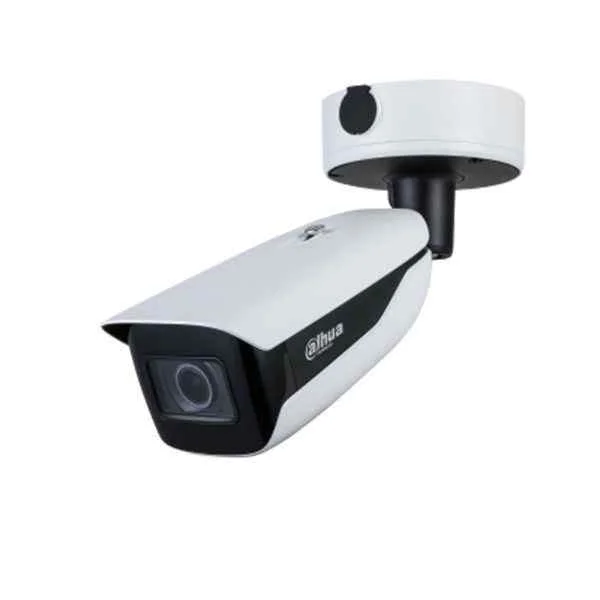
IPC-HFW71242H-Z (Dahua Project Exclusive Network Cameras)
4.7 (6)- Security Camera
- Dahua
- Bullet
- IP Camera
- 4MP
- Fixed
- Motion Detection
Est Value In stock
First-Time Buyer Discount – Get up to 2% additional off on your first order
ORM Rewards Earn $50 in Rewards + Free Expedited Delivery – Join Now!
Use eCoupon ORMSAVE10
eCoupon limited to 5 units

ORM Sales Advisors
Buying for your business? Get a personalised quote in under 2 hours. Talk to an expert
LEARNFilters (1) 
Questions & Answers
What is a Dahua Network Camera?
A Dahua Network Camera is an IP-based video surveillance device that streams high-resolution video over Ethernet, delivering scalable, remote-viewable security for homes and businesses.
How do I install a Dahua Network Camera?
Mount the camera at the desired location, connect it to a PoE switch or power adapter, configure its IP address via Dahua’s SADP tool, and access the live feed through a web browser or NVR.
What network requirements are needed for Dahua Network Cameras?
Dahua Network Cameras require a stable Ethernet connection (10/100/1000 Mbps), DHCP or static IP assignment, and sufficient bandwidth (at least 1–3 Mbps per 1080p stream) for optimal performance.
Do Dahua Network Cameras support Power over Ethernet (PoE)?
Yes, most Dahua Network Cameras support IEEE 802.3af/at PoE standards, allowing video and power to be delivered over a single Ethernet cable for easy installation.
How do I access my Dahua Network Camera remotely?
Use Dahua’s DMSS or DSS Express app with your camera’s serial number or configure port forwarding on your router, then log in via the app or web interface for live remote viewing.
What are the resolution options for Dahua Network Cameras?
Dahua offers resolutions from 2 MP (1080p) up to 12 MP (4K+), including 4K (8 MP) and Wide Dynamic Range (WDR) models for superior clarity in varied lighting conditions.
How do I integrate a Dahua Network Camera with an NVR?
Connect the camera to the same network as the NVR, use the NVR’s ‘Add Camera’ function to auto-discover the device or enter its IP credentials manually, and begin recording.
Are Dahua Network Cameras ONVIF compliant?
Yes, Dahua Network Cameras comply with ONVIF Profile S and G, ensuring interoperability with third-party NVRs, VMS platforms, and security systems.
What analytics features are available in Dahua Network Cameras?
Dahua cameras offer intelligent analytics such as motion detection, line crossing, intrusion, face detection, and people counting for proactive security monitoring.
How secure is the data on Dahua Network Cameras?
Dahua implements HTTPS encryption, user authentication, firmware integrity checks, and secure boot to protect video streams and camera settings from unauthorized access.
How do I update the firmware on a Dahua Network Camera?
Download the latest firmware from Dahua’s official website, log in to the camera’s web GUI, navigate to Maintenance > Upgrade, upload the firmware file, and reboot the device.
Which mobile app works with Dahua Network Cameras?
Dahua’s DMSS (Digital Mobile Surveillance System) app is available for iOS and Android, offering live view, playback, alarm notifications, and PTZ control on smartphones and tablets.
What storage options are available for Dahua Network Cameras?
Dahua cameras support on-board microSD cards (up to 256 GB), NAS via NFS/SMB, and centralized storage on Dahua NVRs or DSS servers for continuous or event-based recording.
How do I troubleshoot common issues with Dahua Network Cameras?
Check power and network connections, verify IP settings with the SADP tool, update firmware, reset the camera to factory defaults, and consult Dahua’s knowledge base for error codes.
What warranty does Dahua offer for Network Cameras?
Dahua provides a standard three-year warranty on network cameras, covering hardware defects and offering firmware updates, with extended warranty options available through authorized partners.
How do Dahua Network Cameras contribute to security ROI?
By delivering high-resolution video, intelligent analytics, PoE simplicity, and easy integration, Dahua Network Cameras reduce operational costs, prevent losses, and justify security investments.