 United States
Security Cameras Dahua 5Mp PTZ
Experience high-resolution performance with Dahua 5Mp PTZ cameras engineered for optimal surveillance and advanced tracking. Enhance security with reliable analytics and robust remote management features.
Talk to an expert
1 Matching results
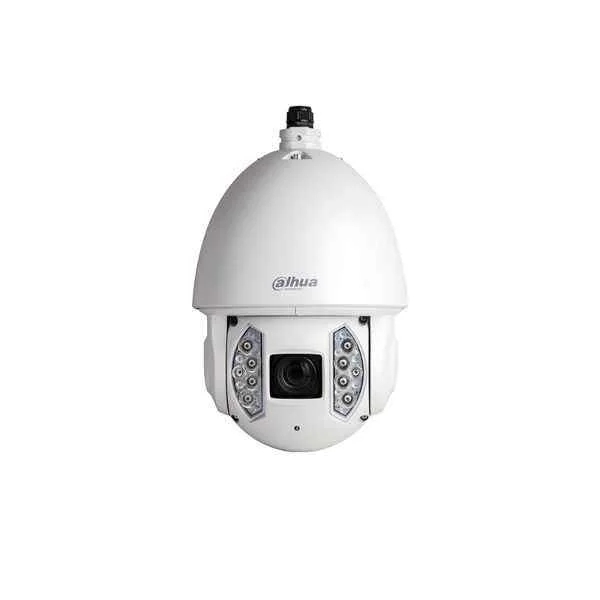
6AE530UNI (Dahua 5MP PTZ)
4.8 (6)- Security Camera
- Dahua
- Turret
- IP Camera
- 8MP
- Motorized
- Motion Detection / ANPR
Est Value In stock
First-Time Buyer Discount – Get up to 2% additional off on your first order
ORM Rewards Earn $50 in Rewards + Free Expedited Delivery – Join Now!
Use eCoupon ORMSAVE10
eCoupon limited to 5 units

ORM Sales Advisors
Buying for your business? Get a personalised quote in under 2 hours. Talk to an expert
LEARNFilters (1) 
Questions & Answers
What is the maximum resolution of the Dahua 5MP PTZ camera?
The Dahua 5MP PTZ camera captures video at a maximum resolution of 2592 × 1944 pixels, delivering sharp, detailed images for advanced surveillance.
How much optical zoom does the Dahua 5MP PTZ support?
The Dahua 5MP PTZ features a powerful 25× optical zoom, enabling clear identification of distant targets without sacrificing image quality.
What is the night vision range of the Dahua 5MP PTZ camera?
Equipped with infrared LEDs, the Dahua 5MP PTZ achieves up to 150 meters of night vision, ensuring reliable 24/7 monitoring in complete darkness.
What pan and tilt speeds are available on the Dahua 5MP PTZ?
The Dahua 5MP PTZ offers pan speeds from 0.1°/s to 240°/s and tilt speeds from 0.1°/s to 100°/s for rapid, precise positioning across wide areas.
Is the Dahua 5MP PTZ camera weatherproof?
Yes. The Dahua 5MP PTZ is IP66-rated against dust and water ingress and operates in temperatures from –40°C to 65°C, making it ideal for outdoor deployment.
Does the Dahua 5MP PTZ support Wide Dynamic Range (WDR)?
The Dahua 5MP PTZ includes 120 dB True WDR, which balances light and dark regions to produce clear, evenly exposed images in high-contrast scenes.
Can I power the Dahua 5MP PTZ camera via PoE?
Yes. The Dahua 5MP PTZ supports IEEE 802.3at Power-over-Ethernet, simplifying installation by delivering data and up to 30 W of power over a single CAT5e/CAT6 cable.
Is the Dahua 5MP PTZ compatible with network video recorders (NVRs)?
The Dahua 5MP PTZ is ONVIF Profile S–compliant and fully compatible with most third‐party NVRs for seamless integration and centralized recording.
Does the Dahua 5MP PTZ offer intelligent tracking?
Yes. The Dahua 5MP PTZ features Auto-Tracking III, which automatically follows moving targets and adjusts pan/tilt/zoom to maintain optimal framing.
What network protocols are supported by the Dahua 5MP PTZ camera?
The Dahua 5MP PTZ supports TCP/IP, HTTP, HTTPS, DHCP, DNS, RTP, RTSP, SMTP, NTP, SNMP, and ONVIF for robust network interoperability.
How do I remotely access a Dahua 5MP PTZ camera on my smartphone?
Download the Dahua DMSS mobile app, scan the camera’s QR code, and enter your credentials to view live feeds and control PTZ functions from anywhere.
What local storage options does the Dahua 5MP PTZ support?
The Dahua 5MP PTZ supports a built-in microSD card slot that accommodates up to 256 GB for on-board recording and local backup.
Does the Dahua 5MP PTZ camera support alarm input and output?
Yes. The Dahua 5MP PTZ offers two alarm inputs and one alarm output, enabling external sensors and sirens to trigger recordings or alerts.
What maintenance is required for the Dahua 5MP PTZ camera?
Periodic lens cleaning and firmware updates are recommended to maintain optimal image quality and ensure the latest security and performance enhancements.
What is the power consumption of the Dahua 5MP PTZ camera?
Under maximum load with IR engaged, the Dahua 5MP PTZ consumes up to 30 W via PoE+ or 36 W when powered by a 12 VDC adapter.
What warranty does Dahua offer for the 5MP PTZ camera?
Dahua backs its 5MP PTZ camera with a standard three-year warranty, covering defects in materials and workmanship for peace of mind.
How do I update the firmware on my Dahua 5MP PTZ camera?
Log in to the Web GUI, navigate to Maintenance → Upgrade, upload the latest firmware file from Dahua’s official website, and click Update to install.