 United States
Category Dahua Core Switches
Enhance your network architecture with Dahua Core Switches engineered for stability and high-performance connectivity. Ideal for sophisticated IT environments demanding reliability and scalable security solutions.
Talk to an expert
1 Matching results
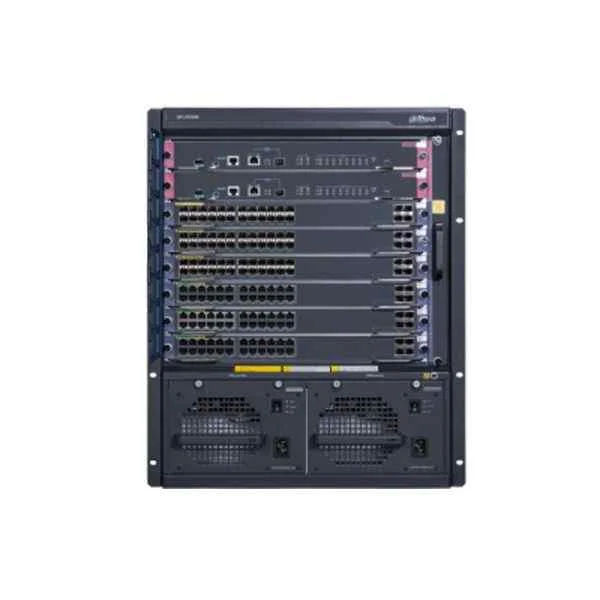
S7606 (Dahua Core Switches)
4.5 (6)- Switch
- Dahua
- Redundant Power Supply
- Layer 2 / Layer 3
- Rack-mount
- 250 W
- 24–48 Ports
Est Value In stock
First-Time Buyer Discount – Get up to 2% additional off on your first order
ORM Rewards Earn $50 in Rewards + Free Expedited Delivery – Join Now!
Use eCoupon ORMSAVE10
eCoupon limited to 5 units

ORM Sales Advisors
Buying for your business? Get a personalised quote in under 2 hours. Talk to an expert
LEARNFilters (1) 
Questions & Answers
What is a Dahua Core Switch?
A Dahua Core Switch is a high-performance network switch designed to manage and distribute data traffic at the network backbone using advanced Layer 2 and Layer 3 switching features.
What are the key features of Dahua Core Switches?
Key features include high port density, 10GbE uplinks, PoE/PoE+ support, QoS, VLAN segmentation, link aggregation, and comprehensive security protocols for enterprise-grade networks.
How do I choose the right Dahua Core Switch model?
Select a model based on required port count, PoE budget, uplink speed, redundancy needs, and network size. Compare specifications in the Dahua product catalog for optimal fit.
Can Dahua Core Switches handle Power over Ethernet (PoE)?
Yes. Many Dahua Core Switch models support both IEEE 802.3af and 802.3at PoE/PoE+ with up to 30W per port for IP cameras, VoIP phones, and wireless access points.
What management interfaces do Dahua Core Switches offer?
Dahua Core Switches offer web GUI, CLI (SSH/Telnet), SNMP, and Dahua NMS compatibility for centralized management, monitoring, and firmware updates.
What redundancy features are available on Dahua Core Switches?
Redundancy features include VRRP, STP/RSTP/MSTP, link aggregation (LACP), and dual power supplies to ensure uninterrupted network uptime.
How do I configure VLANs on a Dahua Core Switch?
Access the web GUI or CLI, navigate to the VLAN menu, create VLAN IDs, assign ports, and apply changes. Detailed steps are in the Dahua configuration guide.
What is the maximum throughput of a Dahua Core Switch?
Depending on the model, throughput ranges from 128 Gbps to over 480 Gbps, ensuring sufficient capacity for high-density and high-bandwidth applications.
Are Dahua Core Switches compatible with third-party devices?
Yes. Dahua Core Switches adhere to standard IEEE protocols (802.3, 802.1Q, 802.3ad, etc.) for seamless integration with routers, firewalls, and access switches from other vendors.
How is Quality of Service (QoS) implemented on Dahua Core Switches?
Dahua Core Switches provide multi-level QoS with traffic classification, prioritization, rate limiting, and DSCP support to optimize voice, video, and data performance.
What Layer 3 routing protocols do Dahua Core Switches support?
They support static routing, RIP, OSPF, and VRRP, enabling dynamic route management and high availability in complex enterprise networks.
What power supply options are available for Dahua Core Switches?
Models offer internal dual AC power supplies or hot-swappable redundant modules for power resilience and ease of maintenance without downtime.
How do Dahua Core Switches enhance network security?
They include ACLs, 802.1X port authentication, DHCP snooping, IP source guard, storm control, and Secure Shell (SSH) to protect against unauthorized access and attacks.
What warranty and support options does Dahua offer for Core Switches?
Dahua provides a standard three-year warranty, optional extended service plans, and global technical support through authorized partners and online resources.
How can I update the firmware on a Dahua Core Switch?
Download the latest firmware from the Dahua support portal, upload it via the web GUI or CLI, and follow on-screen instructions to complete the upgrade safely.