 United States
Networking Cisco MDS 9000 SFP
Enhance your network's reliability with premium Cisco MDS 9000 Compatible SFP modules designed for seamless integration, optimal performance, and superior data transmission in demanding environments.
Talk to an expert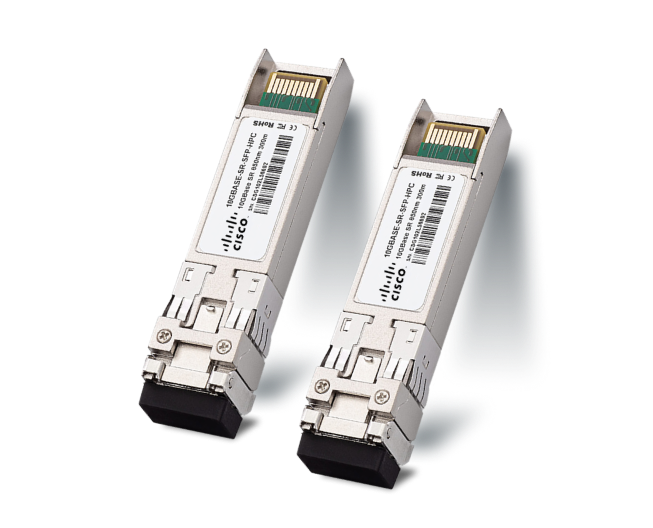
16 Matching results
DS-SFP-FCGE-SW-C (1/2G Fibre Channel & GigE Shortwave SFP Cisco MDS 9000 Compatible)
4.8 (5)- Transceiver
- Orm
- SFP
- 1G
- LC
- 850 nm
- Short-Range
Est Value In stock
First-Time Buyer Discount – Get up to 2% additional off on your first order
ORM Rewards Earn $50 in Rewards + Free Expedited Delivery – Join Now!
Use eCoupon ORMSAVE10
eCoupon limited to 5 units
DS-SFP-FCGE-LW-C (1/2G Fibre Channel & GigE Longwave SFP Cisco MDS 9000 Compatible)
4.6 (5)- Transceiver
- Orm
- SFP
- 1G
- LC
- 1310nm
- Long-Range
Est Value In stockFirst-Time Buyer Discount – Get up to 2% additional off on your first order
ORM Rewards Earn $50 in Rewards + Free Expedited Delivery – Join Now!
Use eCoupon ORMSAVE10
eCoupon limited to 5 units
DS-SFP-GE-T-C (1G Copper SFP RJ-45 Cisco MDS 9000 Compatible)
5 (5)- Transceiver
- Orm
- SFP
- 1G
- RJ45
- Short-Range
Est Value In stockFirst-Time Buyer Discount – Get up to 2% additional off on your first order
ORM Rewards Earn $50 in Rewards + Free Expedited Delivery – Join Now!
Use eCoupon ORMSAVE10
eCoupon limited to 5 units
DS-SFP-FC-2G-SW-C (2Gbps Fibre Channel SW SFP Cisco MDS 9000 Compatible)
4.8 (5)- Transceiver
- Orm
- SFP
- 2G
- LC
- Short-Range
Est Value In stockFirst-Time Buyer Discount – Get up to 2% additional off on your first order
ORM Rewards Earn $50 in Rewards + Free Expedited Delivery – Join Now!
Use eCoupon ORMSAVE10
eCoupon limited to 5 units
DS-SFP-FC-2G-LW-C (2Gbps Fibre Channel LW SFP Cisco MDS 9000 Compatible)
4.8 (5)- Transceiver
- Orm
- SFP
- 2G
- LC
- 1310 nm
- Long-Range
Est Value In stockFirst-Time Buyer Discount – Get up to 2% additional off on your first order
ORM Rewards Earn $50 in Rewards + Free Expedited Delivery – Join Now!
Use eCoupon ORMSAVE10
eCoupon limited to 5 units
DS-SFP-FC4G-SW-C (4Gbps Fibre Channel SW SFP Cisco MDS 9000 Compatible)
4.6 (5)- Transceiver
- Orm
- SFP
- 4G
- LC
- 850 nm
- Short-Range
Est Value In stockFirst-Time Buyer Discount – Get up to 2% additional off on your first order
ORM Rewards Earn $50 in Rewards + Free Expedited Delivery – Join Now!
Use eCoupon ORMSAVE10
eCoupon limited to 5 units
DS-SFP-FC4G-MR-C (4Gbps Fibre Channel LW 4km SFP Cisco MDS 9000 Compatible)
5 (5)- Transceiver
- Orm
- SFP
- 4G
- LC
- 850nm
- Short-Range
Est Value In stockFirst-Time Buyer Discount – Get up to 2% additional off on your first order
ORM Rewards Earn $50 in Rewards + Free Expedited Delivery – Join Now!
Use eCoupon ORMSAVE10
eCoupon limited to 5 units
DS-SFP-FC4G-LW-C (4Gbps Fibre Channel LW 10km SFP Cisco MDS 9000 Compatible)
4.6 (5)- Transceiver
- Orm
- SFP
- 4G
- LC
- 1310 nm
- Long-Range
Est Value In stockFirst-Time Buyer Discount – Get up to 2% additional off on your first order
ORM Rewards Earn $50 in Rewards + Free Expedited Delivery – Join Now!
Use eCoupon ORMSAVE10
eCoupon limited to 5 units
DS-SFP-FC8G-SW-C (8Gbps Fibre Channel SW SFP+ Cisco MDS 9000 Compatible)
4.2 (5)- Transceiver
- Orm
- SFP
- 8G
- LC
- 850 nm
- Short-Range
Est Value In stockFirst-Time Buyer Discount – Get up to 2% additional off on your first order
ORM Rewards Earn $50 in Rewards + Free Expedited Delivery – Join Now!
Use eCoupon ORMSAVE10
eCoupon limited to 5 units
DS-SFP-FC8G-LW-C (8Gbps Fibre Channel LW SFP+ Cisco MDS 9000 Compatible)
4.4 (5)- Transceiver
- Orm
- SFP
- 8G
- LC
- 1310 nm
- Long-Range
Est Value In stockFirst-Time Buyer Discount – Get up to 2% additional off on your first order
ORM Rewards Earn $50 in Rewards + Free Expedited Delivery – Join Now!
Use eCoupon ORMSAVE10
eCoupon limited to 5 units
DS-SFP-FC8G-ER-C (8Gbps Fibre Channel ER SFP+ Cisco MDS 9000 Compatible)
4.6 (5)- Transceiver
- Orm
- SFP
- 8G
- LC
- 1310 nm
- Extended-Range
Est Value In stockFirst-Time Buyer Discount – Get up to 2% additional off on your first order
ORM Rewards Earn $50 in Rewards + Free Expedited Delivery – Join Now!
Use eCoupon ORMSAVE10
eCoupon limited to 5 units
DS-SFP-FC16G-SW-C (16Gbps Fibre Channel SW SFP+ Cisco MDS Compatible)
4.2 (5)- Transceiver
- Orm
- SFP
- 16G
- LC
- 850 nm
- Short-Range
Est Value In stockFirst-Time Buyer Discount – Get up to 2% additional off on your first order
ORM Rewards Earn $50 in Rewards + Free Expedited Delivery – Join Now!
Use eCoupon ORMSAVE10
eCoupon limited to 5 units
DS-SFP-FC16G-LW-C (16Gbps Fibre Channel LW SFP+ Cisco MDS Compatible)
4.6 (5)- Transceiver
- Orm
- SFP
- 16G
- LC
- Long Wave
- Long-Range
Est Value In stockFirst-Time Buyer Discount – Get up to 2% additional off on your first order
ORM Rewards Earn $50 in Rewards + Free Expedited Delivery – Join Now!
Use eCoupon ORMSAVE10
eCoupon limited to 5 units
DS-SFP-FC16G-ELW-C (16Gbps Fibre Channel ELW SFP+ Cisco MDS Compatible)
4.2 (5)- Transceiver
- Orm
- SFP
- 16G
- LC
- 1310 nm
- Long-Range
Est Value In stockFirst-Time Buyer Discount – Get up to 2% additional off on your first order
ORM Rewards Earn $50 in Rewards + Free Expedited Delivery – Join Now!
Use eCoupon ORMSAVE10
eCoupon limited to 5 units
DS-SFP-FC32G-SW-C (32Gbps Fibre Channel SW SFP+ Cisco MDS Compatible)
4.6 (5)- Transceiver
- Orm
- SFP
- 32G
- LC
- 850 nm
- Short-Range
Est Value In stockFirst-Time Buyer Discount – Get up to 2% additional off on your first order
ORM Rewards Earn $50 in Rewards + Free Expedited Delivery – Join Now!
Use eCoupon ORMSAVE10
eCoupon limited to 5 units
DS-SFP-FC32G-LW-C (32Gbps Fibre Channel LW SFP+ Cisco MDS Compatible)
4.4 (5)- Transceiver
- Orm
- SFP
- 32G
- LC
- 1310 nm
- Long-Range
Est Value In stockFirst-Time Buyer Discount – Get up to 2% additional off on your first order
ORM Rewards Earn $50 in Rewards + Free Expedited Delivery – Join Now!
Use eCoupon ORMSAVE10
eCoupon limited to 5 units

ORM Sales Advisors
Buying for your business? Get a personalised quote in under 2 hours. Talk to an expert
LEARNFilters (16) 
Questions & Answers
What is a Cisco MDS 9000 Compatible SFP?
A Cisco MDS 9000 Compatible SFP is a small form-factor pluggable transceiver designed to meet Cisco MDS 9000 series switch requirements for Fibre Channel connectivity. It provides tested interoperability, optimized performance, and full compliance with industry standards.
Which fiber types do Cisco MDS 9000 Compatible SFPs support?
Cisco MDS 9000 Compatible SFPs support both single-mode (SMF) and multi-mode fiber (MMF) types, enabling flexible deployment across short-reach and long-reach data center links.
What data rates are available for Cisco MDS 9000 Compatible SFPs?
These SFPs are available in 1, 2, 4, 8, 16, 32, and 64 Gbps Fibre Channel data rates, ensuring backward and forward compatibility with evolving SAN environments.
How far can Cisco MDS 9000 Compatible SFPs transmit data?
Cisco MDS 9000 Compatible SFPs offer distances from 100 m on OM4 multimode fiber up to 100 km over single-mode fiber, depending on the transceiver type and fiber media.
Are Cisco MDS 9000 Compatible SFPs hot-swappable?
Yes. Cisco MDS 9000 Compatible SFPs are hot-swappable modules that can be inserted or removed without powering down the switch, minimizing SAN downtime.
Do Cisco MDS 9000 Compatible SFPs require firmware updates?
No. These SFPs come pre-programmed and automatically recognized by Cisco MDS 9000 platforms, eliminating manual firmware updates for most deployments.
Which protocols do Cisco MDS 9000 Compatible SFPs support?
They support standard Fibre Channel protocols (FC-FCP), FCoE (Fibre Channel over Ethernet), and are backward compatible with Fibre Channel Arbitrated Loop (FC-AL).
How do I install a Cisco MDS 9000 Compatible SFP?
Power on the switch, align the SFP module with the slot, gently insert until it clicks, then configure the port via the CLI or GUI. The switch will automatically detect and enable the module.
How can I verify a Cisco MDS 9000 Compatible SFP is working?
Use the Cisco NX-OS CLI command ‘show interface transceiver’ to confirm link status, data rate, and optical diagnostics. Green LEDs on the switch port also indicate proper operation.
What warranty is offered on Cisco MDS 9000 Compatible SFPs?
Most vendors provide a lifetime warranty or limited replacement warranty that covers manufacturing defects and premature failures under normal operating conditions.
Are Cisco MDS 9000 Compatible SFPs genuine Cisco parts?
No. Compatible SFPs are third-party modules engineered to Cisco specifications, delivering cost savings while maintaining full compatibility and performance.
What are the benefits of using Cisco MDS 9000 Compatible SFPs?
They offer significant cost savings, broad vendor support, strict quality testing, and seamless interoperability with Cisco MDS 9000 series switches.
How do I troubleshoot a Cisco MDS 9000 Compatible SFP link issue?
Inspect fiber cleanliness, verify correct fiber type and polarity, check port configuration in the CLI, and review transceiver diagnostics via ‘show interface transceiver detail’.
Where can I purchase Cisco MDS 9000 Compatible SFPs?
Authorized resellers, leading e-commerce marketplaces, and specialized data center hardware vendors offer these SFPs with verified compatibility and warranty coverage.
What are the power consumption specifications for Cisco MDS 9000 Compatible SFPs?
Typical power consumption ranges from 0.7 W for low-speed modules up to 1.5 W for 32 Gbps SFPs, aligning with Cisco’s thermal and power guidelines.
How should I clean and maintain Cisco MDS 9000 Compatible SFPs?
Use lint-free wipes and isopropyl alcohol to clean fiber end faces, inspect connectors regularly, and store modules with dust caps when not in use to ensure optimal performance.