 United States
Cisco Meraki Compatible QSFP+ Transceivers
Experience reliable, high-speed connectivity with our Cisco Meraki compatible QSFP+ transceivers. Engineered for peak performance and secure data transmission, they empower enterprise networks with scalable, efficient solutions.
Talk to an expert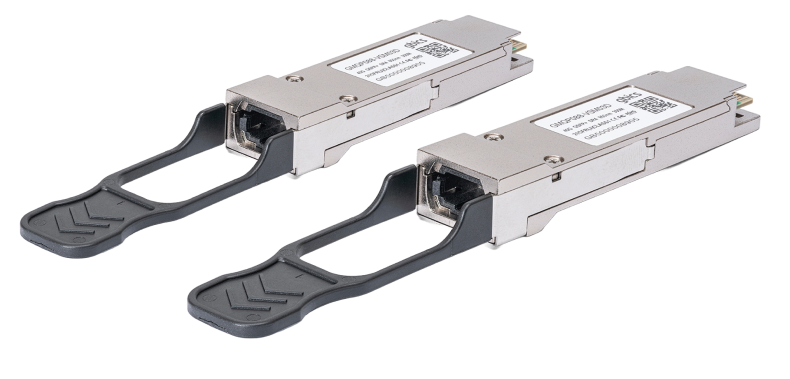
4 Matching results
MA-QSFP-40G-SR4-C (40GBase-SR4 QSFP+ MMF Module Cisco Meraki Compatible)
4.6 (7)- Transceiver
- Orm
- QSFP
- 40G
- MPO
- 850nm
- Short-Range
Est Value In stock
First-Time Buyer Discount – Get up to 2% additional off on your first order
ORM Rewards Earn $50 in Rewards + Free Expedited Delivery – Join Now!
Use eCoupon ORMSAVE10
eCoupon limited to 5 units
MA-QSFP-40G-CSR4-C (40GBASE-CSR4 QSFP+ MMF Module Cisco Meraki Compatible)
4.7 (7)- Transceiver
- Orm
- QSFP
- 40G
- LC
- 850 nm
- Short-Range
Est Value In stockFirst-Time Buyer Discount – Get up to 2% additional off on your first order
ORM Rewards Earn $50 in Rewards + Free Expedited Delivery – Join Now!
Use eCoupon ORMSAVE10
eCoupon limited to 5 units
MA-QSFP-40G-LR4-C (40GBASE-LR4 QSFP+ SMF Module Cisco Meraki Compatible)
4.7 (7)- Transceiver
- Orm
- QSFP
- 40G
- LC
- 1270/1290/1310/1330 nm
- Long-Range
Est Value In stockFirst-Time Buyer Discount – Get up to 2% additional off on your first order
ORM Rewards Earn $50 in Rewards + Free Expedited Delivery – Join Now!
Use eCoupon ORMSAVE10
eCoupon limited to 5 units
MA-QSFP-40G-SR-BD-C (QSFP40G BiDi Short-reach Transceiver Cisco Meraki Compatible)
4.4 (7)- Transceiver
- Orm
- QSFP
- 40G
- LC
- 850 nm
- Short-Range
Est Value In stockFirst-Time Buyer Discount – Get up to 2% additional off on your first order
ORM Rewards Earn $50 in Rewards + Free Expedited Delivery – Join Now!
Use eCoupon ORMSAVE10
eCoupon limited to 5 units

ORM Sales Advisors
Buying for your business? Get a personalised quote in under 2 hours. Talk to an expert
LEARNFilters (4) 
Questions & Answers
What is a Cisco Meraki Compatible QSFP+ module?
A Cisco Meraki Compatible QSFP+ module is a hot-swappable four-channel transceiver designed to provide 40 Gbps connectivity on Meraki switches, offering seamless integration and full compliance with Cisco Meraki hardware specifications.
What are the key benefits of using Cisco Meraki Compatible QSFP+ modules?
Key benefits include reliable 40 Gbps performance, seamless Meraki switch integration, cost-effective third-party options, low power consumption, and simplified installation without firmware or compatibility issues.
Which Cisco Meraki switches support QSFP+ modules?
Cisco Meraki MS420, MS425, MS450, MS480, MS410, and MS425 series switches support QSFP+ modules in designated 40 Gbps uplink slots for high-density aggregation and campus backbone applications.
How do I install a Cisco Meraki Compatible QSFP+ module?
To install, power off the Meraki switch or ensure the port is disabled, align the QSFP+ module with the SFP+ slot, gently slide until it clicks, then re-enable the port or power on the switch.
How can I verify compatibility of a QSFP+ module with my Meraki device?
Verify compatibility by checking the Meraki Hardware Compatibility List (HCL) for supported part numbers, reviewing Meraki dashboard port status, or using CLI show commands to confirm module recognition.
What data rates do Cisco Meraki QSFP+ modules support?
Cisco Meraki QSFP+ modules support aggregated data rates up to 40 Gbps across four 10 Gbps lanes or can be configured as a single 40 Gbps channel for high-speed uplinks.
Can Cisco Meraki Compatible QSFP+ modules support optical and DAC connections?
Yes, compatible QSFP+ modules support both optical transceivers (SR, LR, ER) for multimode and single-mode fiber and Direct Attach Copper (DAC) cables for short-range links.
What is the typical reach of a Meraki-compatible QSFP+ optical module?
Typical reach varies by module type: SR modules cover up to 100 meters over OM4 fiber, LR modules up to 10 kilometers over single-mode fiber, and ER modules up to 40 kilometers.
How do I troubleshoot link issues with a Cisco Meraki QSFP+?
Troubleshoot by checking physical connections, verifying module compatibility in the Meraki dashboard, inspecting port LEDs, reviewing event logs for errors, and testing with a known-good module.
Are Cisco Meraki Compatible QSFP+ modules certified by Cisco?
Third-party QSFP+ modules are not Cisco-branded but leverage reverse-engineered firmware to meet Cisco Meraki compliance standards and maintain full functionality on supported platforms.
What warranty and support options are available for these QSFP+ modules?
Warranty and support vary by vendor but typically include lifetime replacement guarantees, 24/7 technical assistance, and advance RMA services to minimize network downtime.
How do Cisco Meraki QSFP+ modules enhance network scalability?
By enabling 40 Gbps uplinks, QSFP+ modules allow aggregation of multiple 10 Gbps links, simplify campus spine-leaf design, and support future bandwidth growth without additional hardware.
What is the power consumption of a QSFP+ module on a Meraki switch?
Power consumption typically ranges from 2.5 W to 3.5 W per QSFP+ module, depending on optical type or DAC, with Meraki dashboard metrics available for real-time monitoring.
Can I mix Cisco-branded and compatible QSFP+ modules in the same network?
Yes, mixing Cisco-branded and compatible QSFP+ modules is supported as long as all modules appear correctly in the Meraki dashboard and comply with Cisco Meraki’s HCL.
What factors should I consider when selecting a Meraki-compatible QSFP+?
Consider link distance, fiber type, data rate requirements, vendor warranty, and compliance with the Cisco Meraki Hardware Compatibility List to ensure optimal performance.
How do firmware updates affect QSFP+ module performance?
Meraki firmware updates include transceiver compatibility improvements and performance optimizations; ensure your dashboard shows no transceiver errors after updates to maintain reliable operation.