 United States
Cisco Ons Compatible Xfp Dwdm Modules
Experience unparalleled network efficiency with Cisco Ons Compatible Xfp Dwdm modules. Engineered for superior reliability, these advanced optical transceivers optimize performance in dynamic, high-speed communication environments.
Talk to an expert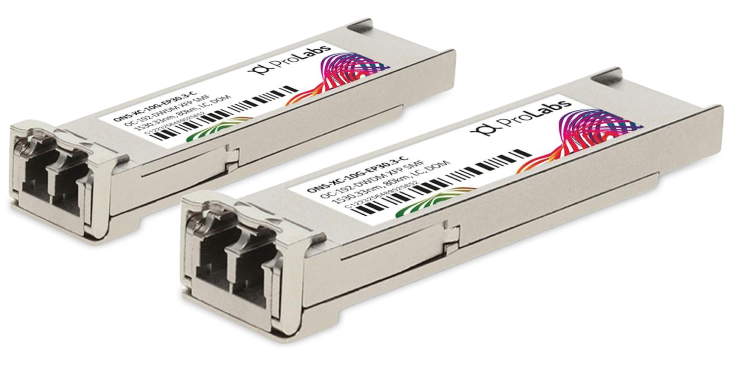
46 Matching results

ONS-XC-10G-EP30.3-C (10G MR XFP Edge Performance 1530.33 100 GHz Cisco ONS Compatible)
4.8 (6)- Transceiver
- Orm
- SFP+
- 10G
- LC Duplex
- Long-Range
Est Value In stock
First-Time Buyer Discount – Get up to 2% additional off on your first order
ORM Rewards Earn $50 in Rewards + Free Expedited Delivery – Join Now!
Use eCoupon ORMSAVE10
eCoupon limited to 5 units

ONS-XC-10G-EP31.1-C (10G MR XFP Edge Performance 1531.12 100 GHz Cisco ONS Compatible)
4.5 (6)- Transceiver
- Orm
- SFP+
- 10G
- LC
- 1310 nm
- Long-Range
Est Value In stockFirst-Time Buyer Discount – Get up to 2% additional off on your first order
ORM Rewards Earn $50 in Rewards + Free Expedited Delivery – Join Now!
Use eCoupon ORMSAVE10
eCoupon limited to 5 units

ONS-XC-10G-EP31.9-C (10G MR XFP Edge Performance 1531.90 100 GHz Cisco ONS Compatible)
4.7 (6)- Transceiver
- Orm
- SFP+
- 10G
- LC
- 1310nm
- Long-Range
Est Value In stockFirst-Time Buyer Discount – Get up to 2% additional off on your first order
ORM Rewards Earn $50 in Rewards + Free Expedited Delivery – Join Now!
Use eCoupon ORMSAVE10
eCoupon limited to 5 units

ONS-XC-10G-EP32.6-C (10G MR XFP Edge Performance 1532.68 100 GHz Cisco ONS Compatible)
4.7 (6)- Transceiver
- Orm
- SFP+
- 10G
- LC
- 1310 nm
- Long-Range
Est Value In stockFirst-Time Buyer Discount – Get up to 2% additional off on your first order
ORM Rewards Earn $50 in Rewards + Free Expedited Delivery – Join Now!
Use eCoupon ORMSAVE10
eCoupon limited to 5 units

ONS-XC-10G-EP33.4-C (10G MR XFP Edge Performance 1533.47 100 GHz Cisco ONS Compatible)
4.8 (6)- Transceiver
- Orm
- SFP+
- 10G
- LC
- 1310 nm
- Extended-Range
Est Value In stockFirst-Time Buyer Discount – Get up to 2% additional off on your first order
ORM Rewards Earn $50 in Rewards + Free Expedited Delivery – Join Now!
Use eCoupon ORMSAVE10
eCoupon limited to 5 units

ONS-XC-10G-EP34.2-C (10G MR XFP Edge Performance 1534.25 100 GHz Cisco ONS Compatible)
4.8 (6)- Transceiver
- Orm
- SFP+
- 10G
- LC
- 1310 nm
- Long-Range
Est Value In stockFirst-Time Buyer Discount – Get up to 2% additional off on your first order
ORM Rewards Earn $50 in Rewards + Free Expedited Delivery – Join Now!
Use eCoupon ORMSAVE10
eCoupon limited to 5 units

ONS-XC-10G-EP35.0-C (10G MR XFP Edge Performance 1535.04 100 GHz Cisco ONS Compatible)
4.8 (6)- Transceiver
- Orm
- SFP+
- 10G
- LC
- 1310 nm
- Extended-Range
Est Value In stockFirst-Time Buyer Discount – Get up to 2% additional off on your first order
ORM Rewards Earn $50 in Rewards + Free Expedited Delivery – Join Now!
Use eCoupon ORMSAVE10
eCoupon limited to 5 units

ONS-XC-10G-EP35.8-C (10G MR XFP Edge Performance 1535.82 100 GHz Cisco ONS Compatible)
4.8 (6)- Transceiver
- Orm
- SFP+
- 10G
- LC
- 1310 nm
- Long-Range
Est Value In stockFirst-Time Buyer Discount – Get up to 2% additional off on your first order
ORM Rewards Earn $50 in Rewards + Free Expedited Delivery – Join Now!
Use eCoupon ORMSAVE10
eCoupon limited to 5 units

ONS-XC-10G-EP36.6-C (10G MR XFP Edge Performance 1536.61 100 GHz Cisco ONS Compatible)
4.5 (6)- Transceiver
- Orm
- SFP+
- 10G
- LC
- 1310 nm
- Long-Range
Est Value In stockFirst-Time Buyer Discount – Get up to 2% additional off on your first order
ORM Rewards Earn $50 in Rewards + Free Expedited Delivery – Join Now!
Use eCoupon ORMSAVE10
eCoupon limited to 5 units

ONS-XC-10G-EP37.4-C (10G MR XFP Edge Performance 1537.40 100 GHz Cisco ONS Compatible)
4.7 (6)- Transceiver
- Orm
- SFP+
- 10G
- LC
- Long-Range
Est Value In stockFirst-Time Buyer Discount – Get up to 2% additional off on your first order
ORM Rewards Earn $50 in Rewards + Free Expedited Delivery – Join Now!
Use eCoupon ORMSAVE10
eCoupon limited to 5 units

ONS-XC-10G-EP38.1-C (10G MR XFP Edge Performance 1538.19 100 GHz Cisco ONS Compatible)
4.7 (6)- Transceiver
- Orm
- SFP+
- 10G
- LC
- 1310 nm
- Long-Range
Est Value In stockFirst-Time Buyer Discount – Get up to 2% additional off on your first order
ORM Rewards Earn $50 in Rewards + Free Expedited Delivery – Join Now!
Use eCoupon ORMSAVE10
eCoupon limited to 5 units

ONS-XC-10G-EP38.9-C (10G MR XFP Edge Performance 1538.98 100 GHz Cisco ONS Compatible)
4.5 (6)- Transceiver
- Orm
- SFP+
- 10G
- LC
- 1310 nm
- Long-Range
Est Value In stockFirst-Time Buyer Discount – Get up to 2% additional off on your first order
ORM Rewards Earn $50 in Rewards + Free Expedited Delivery – Join Now!
Use eCoupon ORMSAVE10
eCoupon limited to 5 units

ONS-XC-10G-EP39.7-C (10G MR XFP Edge Performance 1539.77 100 GHz Cisco ONS Compatible)
4.8 (6)- Transceiver
- Orm
- SFP+
- 10G
- LC
- 1550 nm
- Extended-Range
Est Value In stockFirst-Time Buyer Discount – Get up to 2% additional off on your first order
ORM Rewards Earn $50 in Rewards + Free Expedited Delivery – Join Now!
Use eCoupon ORMSAVE10
eCoupon limited to 5 units

ONS-XC-10G-EP40.5-C (10G MR XFP Edge Performance 1540.56 100 GHz Cisco ONS Compatible)
4.8 (6)- Transceiver
- Orm
- SFP+
- 10G
- LC
- 1310 nm
- Long-Range
Est Value In stockFirst-Time Buyer Discount – Get up to 2% additional off on your first order
ORM Rewards Earn $50 in Rewards + Free Expedited Delivery – Join Now!
Use eCoupon ORMSAVE10
eCoupon limited to 5 units

ONS-XC-10G-EP41.3-C (10G MR XFP Edge Performance 1541.35 100 GHz Cisco ONS Compatible)
4.8 (6)- Transceiver
- Orm
- SFP+
- 10G
- LC
- 1310 nm
- Extended-Range
Est Value In stockFirst-Time Buyer Discount – Get up to 2% additional off on your first order
ORM Rewards Earn $50 in Rewards + Free Expedited Delivery – Join Now!
Use eCoupon ORMSAVE10
eCoupon limited to 5 units

ONS-XC-10G-EP42.1-C (10G MR XFP Edge Performance 1542.14 100 GHz Cisco ONS Compatible)
4.8 (6)- Transceiver
- Orm
- SFP+
- 10G
- LC
- 1310 nm
- Long-Range
Est Value In stockFirst-Time Buyer Discount – Get up to 2% additional off on your first order
ORM Rewards Earn $50 in Rewards + Free Expedited Delivery – Join Now!
Use eCoupon ORMSAVE10
eCoupon limited to 5 units

ONS-XC-10G-EP42.9-C (10G MR XFP Edge Performance 1542.94 100 GHz Cisco ONS Compatible)
4.5 (6)- Transceiver
- Orm
- SFP+
- 10G
- LC
- 1550 nm
- Long-Range
Est Value In stockFirst-Time Buyer Discount – Get up to 2% additional off on your first order
ORM Rewards Earn $50 in Rewards + Free Expedited Delivery – Join Now!
Use eCoupon ORMSAVE10
eCoupon limited to 5 units

ONS-XC-10G-EP43.7-C (10G MR XFP Edge Performance 1543.73 100 GHz Cisco ONS Compatible)
4.8 (6)- Transceiver
- Orm
- SFP+
- 10G
- LC
- 1310 nm
- Long-Range
Est Value In stockFirst-Time Buyer Discount – Get up to 2% additional off on your first order
ORM Rewards Earn $50 in Rewards + Free Expedited Delivery – Join Now!
Use eCoupon ORMSAVE10
eCoupon limited to 5 units

ONS-XC-10G-EP44.5-C (10G MR XFP Edge Performance 1544.53 100 GHz Cisco ONS Compatible)
4.7 (6)- Transceiver
- Orm
- SFP+
- 10G
- LC
- 1310 nm
- Extended-Range
Est Value In stockFirst-Time Buyer Discount – Get up to 2% additional off on your first order
ORM Rewards Earn $50 in Rewards + Free Expedited Delivery – Join Now!
Use eCoupon ORMSAVE10
eCoupon limited to 5 units

ONS-XC-10G-EP45.3-C (10G MR XFP Edge Performance 1545.32 100 GHz Cisco ONS Compatible)
4.8 (6)- Transceiver
- Orm
- SFP+
- 10G
- LC
- 1310 nm
- Long-Range
Est Value In stockFirst-Time Buyer Discount – Get up to 2% additional off on your first order
ORM Rewards Earn $50 in Rewards + Free Expedited Delivery – Join Now!
Use eCoupon ORMSAVE10
eCoupon limited to 5 units

ORM Sales Advisors
Buying for your business? Get a personalised quote in under 2 hours. Talk to an expert
LEARNFilters (46) 
Questions & Answers
What is a Cisco ONS-compatible XFP DWDM module?
A Cisco ONS-compatible XFP DWDM module is a hot-swappable 10G optical transceiver for Dense Wavelength Division Multiplexing on Cisco ONS platforms, providing long-distance, high-capacity data transport with industry-standard wavelength support.
Which models of Cisco ONS XFP DWDM modules are available?
Cisco ONS XFP DWDM modules cover ITU-T C-band channels (1528.77–1563.86 nm) with 100 GHz spacing, offering LR (10 km), ER (40 km) and ZR (80 km) variants for different link distances.
What wavelengths do Cisco ONS XFP DWDM modules support?
They support ITU-T C-band wavelengths from 1528.77 nm to 1563.86 nm with 100 GHz (0.8 nm) channel spacing, enabling up to 40 DWDM channels on a single fiber.
How do I install a Cisco ONS-compatible XFP DWDM module?
Power down the ONS port, align the module with the socket, slide it in until it clicks, reconnect your fiber and power the system back on; the platform auto-detects and configures the transceiver.
Are Cisco ONS XFP DWDM modules hot-swappable?
Yes, all Cisco ONS XFP DWDM modules are hot-swappable, allowing insertion or removal without powering down the system to minimize network downtime.
What is the maximum reach of Cisco ONS XFP DWDM modules?
Cisco ONS XFP DWDM modules support distances from 10 km (LR) up to 80 km (ZR) over single-mode fiber, with optional amplification or dispersion compensation for extended links.
Can Cisco ONS XFP DWDM modules interoperate with third-party DWDM equipment?
Yes, they adhere to MSA and ITU-T standards, ensuring full interoperability with third-party DWDM multiplexers, ROADMs and amplifiers from compatible vendors.
What data rates do Cisco ONS XFP DWDM modules support?
They support data rates up to 11.3 Gbps, accommodating 10G Ethernet, SONET/SDH and Fibre Channel protocols for flexible service deployment.
How do I troubleshoot a Cisco ONS XFP DWDM module?
Verify port status via 'show interface transceiver', check optical power levels, review system logs for alarms, reseat the module and test with a fiber loopback if needed.
Which software versions support Cisco ONS XFP DWDM modules?
They’re supported on Cisco ONS 15454 and 15454 M2 platforms running software release 12.2(9) or later; always consult the Cisco compatibility matrix for exact OS revisions.
What is the typical power consumption of Cisco ONS XFP DWDM modules?
Power consumption ranges from approximately 1.5 W to 2.5 W per transceiver, depending on the variant and operating temperature.
Do Cisco ONS XFP DWDM modules support remote monitoring?
Yes, they support digital diagnostics monitoring (DDM) per SFF-8472, providing real-time optical power, temperature and voltage metrics via SNMP or CLI.
How do I select the correct Cisco ONS XFP DWDM module for my network?
Select based on required ITU channel (wavelength), link distance (LR/ER/ZR), data rate and ONS platform compatibility; refer to Cisco datasheets for detailed specifications.
What is the MTBF for Cisco ONS XFP DWDM modules?
Cisco ONS XFP DWDM modules deliver an MTBF exceeding 1 million hours under normal operating conditions for carrier-grade reliability.
Are Cisco ONS XFP DWDM modules compliant with industry standards?
Yes, they comply with ITU-T G.695, G.694.1, XFP MSA and relevant IEEE standards for wavelength accuracy, channel spacing and optical performance.
What precautions should I take when handling Cisco ONS XFP DWDM modules?
Use ESD-safe tools, avoid touching the optical interfaces, keep protective caps on when not in use and follow Cisco’s safety guidelines to prevent damage or contamination.