 United States
Dell Networking Compatible QSFP28
Crafted for superior performance and reliability, our Dell Networking Compatible QSFP28 offers cutting-edge connectivity solutions ensuring high-speed data transfer, seamless compatibility, and optimized network performance.
Talk to an expert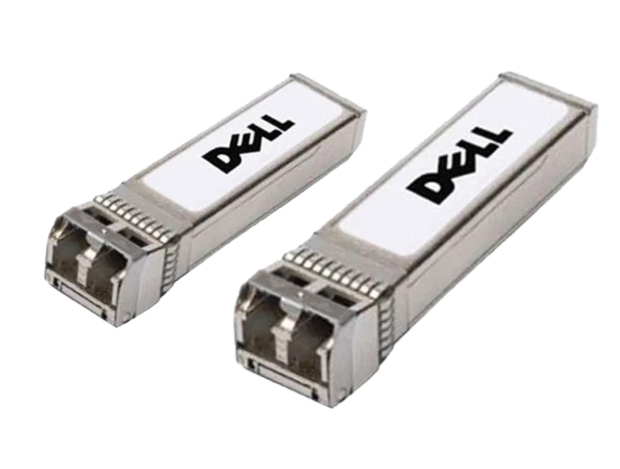
6 Matching results
407-BBSI-C (100GbE QSFP28 SR4 Optic 850nm Dell Compatible)
4.6 (7)- Transceiver
- Orm
- SFP
- 10G
- LC
- 1310 nm
- Long-Range
Est Value In stock
First-Time Buyer Discount – Get up to 2% additional off on your first order
ORM Rewards Earn $50 in Rewards + Free Expedited Delivery – Join Now!
Use eCoupon ORMSAVE10
eCoupon limited to 5 units
407-BBVO-C (100GbE QSFP28 CWDM4 Optic 2KM SMF LC Dell Compatible)
4.6 (7)- Transceiver
- Orm
- SFP+
- 10G
- LC
- 850 nm
- Short-Range
Est Value In stockFirst-Time Buyer Discount – Get up to 2% additional off on your first order
ORM Rewards Earn $50 in Rewards + Free Expedited Delivery – Join Now!
Use eCoupon ORMSAVE10
eCoupon limited to 5 units
407-BBSP-C (100GbE QSFP28 LR4 Lite Optic 1310nm 2Km SMF Dell Compatible)
4.6 (7)- Transceiver
- Orm
- SFP
- 10G
- LC
- 1310 nm
- Long-Range
Est Value In stockFirst-Time Buyer Discount – Get up to 2% additional off on your first order
ORM Rewards Earn $50 in Rewards + Free Expedited Delivery – Join Now!
Use eCoupon ORMSAVE10
eCoupon limited to 5 units
407-BBSL-C (100GbE QSFP28 LR4 Optic 1310nm 10km Dell Compatible)
4.9 (7)- Transceiver
- Orm
- SFP
- 10G
- LC
- 1310nm
- Short-Range
Est Value In stockFirst-Time Buyer Discount – Get up to 2% additional off on your first order
ORM Rewards Earn $50 in Rewards + Free Expedited Delivery – Join Now!
Use eCoupon ORMSAVE10
eCoupon limited to 5 units
407-BCDH-C (100GbE QSFP28 LR4 Transceiver Dell Compatible)
4.9 (7)- Transceiver
- Orm
- SFP+
- 10G
- LC
- 850 nm
- Short-Range
Est Value In stockFirst-Time Buyer Discount – Get up to 2% additional off on your first order
ORM Rewards Earn $50 in Rewards + Free Expedited Delivery – Join Now!
Use eCoupon ORMSAVE10
eCoupon limited to 5 units
407-BBVF-C (100Gbe QSFP28 SWDM4 MMF Transceiver Dell Networking Compatible)
4.6 (7)- Transceiver
- Orm
- SFP+
- 10G
- LC
- 1310 nm
- Long-Range
Est Value In stockFirst-Time Buyer Discount – Get up to 2% additional off on your first order
ORM Rewards Earn $50 in Rewards + Free Expedited Delivery – Join Now!
Use eCoupon ORMSAVE10
eCoupon limited to 5 units

ORM Sales Advisors
Buying for your business? Get a personalised quote in under 2 hours. Talk to an expert
LEARNFilters (6) 
Questions & Answers
What is Dell Networking Compatible QSFP28?
Dell Networking Compatible QSFP28 is a hot-pluggable 100 GbE optical transceiver module fully tested for seamless operation with Dell Networking switches and routers.
Which data rates does QSFP28 support?
The Dell Networking Compatible QSFP28 supports 100 Gbps aggregate bandwidth over four 25 Gbps lanes, enabling high-speed data transfer in modern data centers.
Which cable types are compatible with QSFP28?
Dell Networking Compatible QSFP28 modules support single-mode fiber, multi-mode fiber, active optical cables (AOC), and passive direct attach copper (DAC) cables for flexible deployment.
How far can Dell QSFP28 modules transmit over fiber?
Depending on the module type, Dell Networking Compatible QSFP28 transceivers deliver link distances from 100 meters on OM4 multimode fiber up to 10 kilometers on single-mode fiber.
Is QSFP28 backward compatible with QSFP+ ports?
Yes, many Dell Networking switches support QSFP28 modules in QSFP+ ports at 40 GbE operation, provided the switch firmware is up to date.
How do I install a QSFP28 transceiver in a Dell switch?
To install, power off the port if required, insert the QSFP28 module until it clicks, and verify link status through the switch’s web GUI or CLI.
How do I configure a Dell Networking QSFP28 port?
Use the Dell Networking CLI with the command ‘interface qsfp-port, speed 100g, no shutdown’ or configure through the web interface under Port Settings.
Can I mix Dell and third-party QSFP28 modules?
Dell Networking is validated only with Dell compatible QSFP28 modules; mixing with unsupported third-party optics may result in disabled ports or suboptimal performance.
What are typical QSFP28 use cases?
Dell Networking Compatible QSFP28 modules are ideal for spine-leaf architectures, TOR aggregation, high-density servers, and HPC cluster interconnects.
How do I test a QSFP28 module after installation?
Run optical diagnostics via the switch CLI (‘show interface transceiver diagnostics’) to verify Tx/Rx power, temperature, and voltage within manufacturer specifications.
What is the difference between active and passive QSFP28 DACs?
Passive DACs transmit copper signals without additional electronics for short distances (≤3 m), while active DACs include signal conditioning chips for longer reach (up to 7 m).
What is the power consumption of Dell QSFP28 modules?
Typical power consumption for Dell Networking Compatible QSFP28 optical modules ranges from 2.5 W to 4.5 W, depending on cable type and link distance.
How can I troubleshoot link failures on QSFP28 ports?
Verify fiber polarity, clean end-faces with appropriate tools, confirm port configuration, and check diagnostic counters for Tx/Rx errors in the CLI.
How do I choose the right QSFP28 transceiver for my network?
Select based on desired data rate (100 GbE), link distance, fiber type, and compatibility with your Dell switch model and firmware version.
What warranty covers Dell Networking Compatible QSFP28 modules?
Dell provides a one-year limited hardware warranty on Networking compatible transceivers, with options to extend coverage through Dell ProSupport.