 United States
Blade Servers HPE Compatible X2
Elevate your data center operations with our HPE Blade Server Compatible X2 solution, engineered to deliver unmatched performance, reliability, and seamless integration for critical IT workloads.
Talk to an expert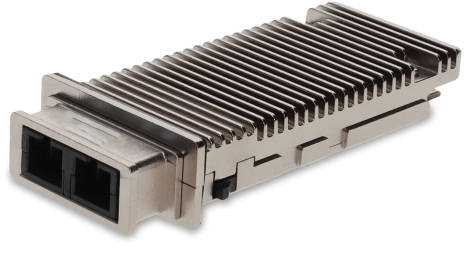
1 Matching results
459006-B21-C (Cisco 10Gb Ethernet Base Short Range X2 Module HP Compatible)
4.4 (5)- Transceiver
- Orm
- SFP+
- 10G
- LC
- 850nm
- Short-Range
Est Value In stock
First-Time Buyer Discount – Get up to 2% additional off on your first order
ORM Rewards Earn $50 in Rewards + Free Expedited Delivery – Join Now!
Use eCoupon ORMSAVE10
eCoupon limited to 5 units

ORM Sales Advisors
Buying for your business? Get a personalised quote in under 2 hours. Talk to an expert
LEARNFilters (1) 
Questions & Answers
What is the HPE Blade Server Compatible X2?
The HPE Blade Server Compatible X2 is a high-density compute module designed for HPE BladeSystem chassis, delivering enhanced performance and scalability for enterprise workloads.
Which HPE BladeSystem enclosures support the Compatible X2 module?
The Compatible X2 module is fully supported in HPE BladeSystem c-Class enclosures such as c7000 and c3000, ensuring seamless integration and management.
What processors are supported by the X2 module?
The X2 module supports dual Intel Xeon Scalable processors, offering up to 28 cores per CPU for demanding virtualization and data analytics tasks.
How much memory can the HPE Blade Server Compatible X2 handle?
The X2 module supports up to 3 TB of DDR4 SmartMemory across 24 DIMM slots, enabling large in-memory databases and accelerated application performance.
What storage options are available on the X2 module?
You can configure up to two NVMe/U.2 SSDs or four SAS/SATA drives per server, delivering a balance of high I/O performance and capacity.
Which network connectivity options does the X2 offer?
The X2 module features onboard FlexibleLOM for up to four 10/25/40/100 GbE ports or optional FLB adapters for advanced networking and converged fabrics.
Which operating systems are validated on the HPE Blade Server Compatible X2?
HPE validates major enterprise OS including VMware ESXi, Microsoft Windows Server, Red Hat Enterprise Linux, SUSE Linux Enterprise Server, and CentOS.
Is the X2 module optimized for virtualization?
Yes, the X2 module is certified for leading hypervisors and supports HPE Virtual Connect, enabling simplified VM deployment and live migration.
How do I install the Compatible X2 in my BladeSystem chassis?
Power down the server bay, slide the X2 module into the guide rails until it clicks, secure the latch, then power on and configure via HPE iLO.
What remote management features are included with the X2?
The module integrates HPE iLO 5 for comprehensive out-of-band management, remote console access, automated firmware updates, and health monitoring.
How can I update the firmware on my X2 module?
Use HPE OneView or iLO 5 to download and apply Service Pack for ProLiant (SPP) bundles, ensuring consistent drivers and firmware across your infrastructure.
What are the power consumption and cooling requirements?
Typical power draw is 250 W per module under full load. Ensure proper front-to-back airflow in a compatible c-Class chassis with adequate PSU headroom.
What warranty and support options are available?
Standard coverage includes a one-year warranty with next-business-day parts replacement, upgradeable to HPE Foundation Care or Proactive Care for 24/7 support.
How does the X2 improve application performance?
By combining high-core-count CPUs, ultra-fast memory, NVMe storage, and low-latency networking, the X2 delivers up to 50% better performance compared to previous generations.
Are third-party blades or modules compatible with the X2?
To maintain full support and performance, HPE recommends using only HPE-qualified modules; unsupported third-party blades may not function correctly.
How do I order the HPE Blade Server Compatible X2?
Contact an authorized HPE reseller or visit the HPE storefront online. Provide your chassis model and required configuration options for a tailored quote.