 United States
Networking SFP Juniper Jx Series
Experience unparalleled performance with our Juniper Jx Series Compatible SFP transceiver. Designed for high-speed data transmission, it delivers robust connectivity and reliable operation, optimizing your enterprise network infrastructure.
Talk to an expert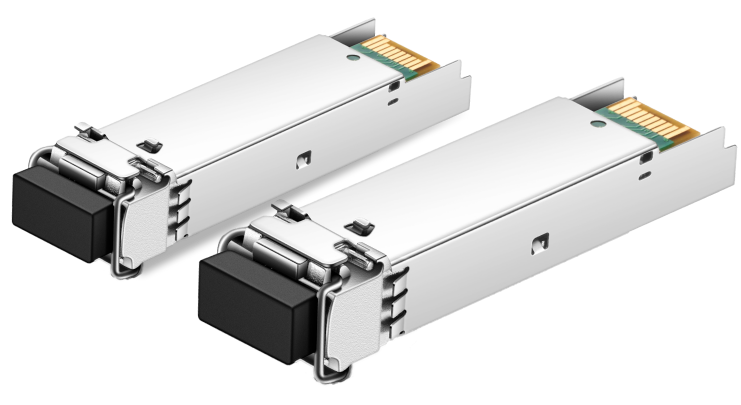
6 Matching results

JX-SFP-1GE-SX-C (SFP 1000BASE-SX Gigabit Optical Transceiver Juniper JX Compatible)
4.6 (5)- Transceiver
- Orm
- SFP
- 1G
- LC
- 850nm
- Short-Range
Est Value In stock
First-Time Buyer Discount – Get up to 2% additional off on your first order
ORM Rewards Earn $50 in Rewards + Free Expedited Delivery – Join Now!
Use eCoupon ORMSAVE10
eCoupon limited to 5 units

JX-SFP-1GE-LX-C (SFP 1000BASE-LX Gigabit Optical Transceiver Juniper JX Compatible)
4.4 (5)- Transceiver
- Orm
- SFP
- 1G
- LC
- 1310 nm
- Long-Range
Est Value In stockFirst-Time Buyer Discount – Get up to 2% additional off on your first order
ORM Rewards Earn $50 in Rewards + Free Expedited Delivery – Join Now!
Use eCoupon ORMSAVE10
eCoupon limited to 5 units

JX-SFP-1GE-LX40K-C (SFP 1000BASE-LX 40KM Gigabit Optical Transceiver Juniper JX Compatible)
4.6 (5)- Transceiver
- Orm
- SFP
- 1G
- LC
- 1310 nm
- Long-Range
Est Value In stockFirst-Time Buyer Discount – Get up to 2% additional off on your first order
ORM Rewards Earn $50 in Rewards + Free Expedited Delivery – Join Now!
Use eCoupon ORMSAVE10
eCoupon limited to 5 units

JX-SFP-1GE-LH-C (SFP 1000BASE-LH Gigabit Optical Transceiver Juniper JX Compatible)
4.8 (5)- Transceiver
- Orm
- SFP
- 1G
- LC
- 1310nm
- Long-Range
Est Value In stockFirst-Time Buyer Discount – Get up to 2% additional off on your first order
ORM Rewards Earn $50 in Rewards + Free Expedited Delivery – Join Now!
Use eCoupon ORMSAVE10
eCoupon limited to 5 units

JX-SFP-1GE-T-C (SFP GE Copper Transceiver Juniper JX Compatible)
4.8 (5)- Transceiver
- Orm
- SFP
- 1G
- RJ45
- Short-Range
Est Value In stockFirst-Time Buyer Discount – Get up to 2% additional off on your first order
ORM Rewards Earn $50 in Rewards + Free Expedited Delivery – Join Now!
Use eCoupon ORMSAVE10
eCoupon limited to 5 units

JX-SFP-1FE-FX-C (SFP FE Optical Transceiver Juniper JX Compatible)
4.8 (5)- Transceiver
- Orm
- SFP
- 100 Mbps
- LC
- 1300 nm
- Short-Range
Est Value In stockFirst-Time Buyer Discount – Get up to 2% additional off on your first order
ORM Rewards Earn $50 in Rewards + Free Expedited Delivery – Join Now!
Use eCoupon ORMSAVE10
eCoupon limited to 5 units

ORM Sales Advisors
Buying for your business? Get a personalised quote in under 2 hours. Talk to an expert
LEARNFilters (6) 
Questions & Answers
What is a Juniper Jx Series Compatible SFP?
A Juniper Jx Series Compatible SFP is a third-party Small Form-Factor Pluggable transceiver fully interoperable with Juniper’s Jx Series routers and switches, offering the same form factor, performance, and standards compliance as OEM modules.
Which data rates do Juniper Jx Series Compatible SFPs support?
Juniper Jx Series Compatible SFPs support industry-standard data rates of 1 Gbps, 10 Gbps, and 25 Gbps, matching the native port speeds of your Jx Series equipment.
Are Juniper Jx Series Compatible SFPs fully plug-and-play with Jx Series devices?
Yes. These compatible SFPs are pre-programmed to Juniper MIBs and EEPROM signatures, ensuring automatic recognition and seamless plug-and-play operation.
What fiber types are supported by Juniper Jx Series Compatible SFPs?
They support both single-mode (SMF) and multimode (MMF) fiber, with LC duplex connectors for 850 nm, 1310 nm, and 1550 nm wavelengths depending on the model.
What is the maximum transmission distance for these SFP modules?
Maximum reach varies by model: multimode SFPs cover up to 550 m, single-mode small form-factor supports up to 10 km, and extended-reach variants can reach 80 km or more.
Do Juniper Jx Series Compatible SFPs comply with MSA standards?
Yes. They are fully compliant with SFP MSA, SFP+ MSA, and SFF Multi-Source Agreement standards, guaranteeing mechanical and electrical interoperability.
Can I hot-swap a Compatible SFP module in my Juniper Jx Series router?
Absolutely. Juniper Jx Series Compatible SFPs support hot-swapping, allowing you to install or remove modules without powering down the device.
What operating temperature range do these SFPs support?
Standard models operate between 0°C and 70°C, while industrial-grade variants handle extended ranges from –40°C to 85°C for harsh environments.
How do I install a Juniper Jx Series Compatible SFP?
Gently insert the module into the empty SFP slot until it clicks, connect the fiber cable, and verify link status via the CLI or the device’s front-panel LEDs.
How can I verify that my Compatible SFP is recognized by Juniper Jx Series equipment?
Use the CLI command ‘show interfaces diagnostics optics’ to confirm module details, link status, and diagnostic readings match expected specifications.
What warranty covers Juniper Jx Series Compatible SFPs?
Most suppliers offer a minimum lifetime warranty covering manufacturing defects, with advanced replacement options and full technical support.
Can Juniper Jx Series Compatible SFPs be used alongside OEM modules from other vendors?
Yes. They interoperate with OEM SFPs in mixed-vendor environments, provided all modules share compatible speed, wavelength, and connector types.
How do compatible SFP prices compare to Juniper OEM modules?
Compatible SFPs typically cost 30–60% less than OEM counterparts while delivering equivalent performance and full Juniper Jx Series compatibility.
What should I do if my Juniper Jx Series Compatible SFP loses link?
First, check fiber integrity and connector cleanliness. Then verify module installation and run ‘show interfaces diagnostics optics’ to troubleshoot signal levels.
Are custom wavelength options available for these SFP modules?
Yes. Many vendors offer custom wavelength configurations (e.g., CWDM/DWDM) for Juniper Jx Series Compatible SFPs to suit diverse network designs.
How do I choose the right part number for my Juniper Jx Series Compatible SFP?
Match your port speed, fiber type, wavelength, and distance requirements. Refer to the vendor’s compatibility matrix or consult technical support for guidance.