 United States
Networking Juniper Netscreen SFP
Optimize performance with Juniper Netscreen SFP, engineered for seamless compatibility, superior reliability, and streamlined integration—ensuring robust, high-speed connectivity and secure network operations tailored for professional environments.
Talk to an expert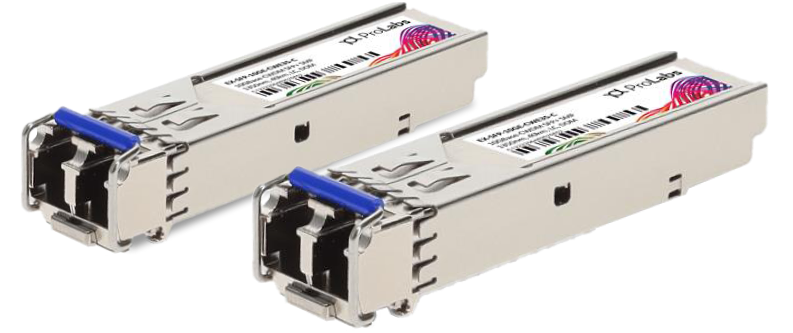
5 Matching results
NS-500-MSX-C (SX Transceiver Mini-GBIC Juniper/NetScreen 500 Compatible)
4.7 (6)- Transceiver
- Orm
- QSFP+
- 100G
- LC
- 850nm
- Short-Range
Est Value In stock
First-Time Buyer Discount – Get up to 2% additional off on your first order
ORM Rewards Earn $50 in Rewards + Free Expedited Delivery – Join Now!
Use eCoupon ORMSAVE10
eCoupon limited to 5 units
NS-500-MLX-C (LX Transceiver Mini-GBIC Juniper/NetScreen 500 Compatible)
4.7 (6)- Transceiver
- Orm
- QSFP+
- 100G
- LC
- 1310 nm
- Long-Range
Est Value In stockFirst-Time Buyer Discount – Get up to 2% additional off on your first order
ORM Rewards Earn $50 in Rewards + Free Expedited Delivery – Join Now!
Use eCoupon ORMSAVE10
eCoupon limited to 5 units
NS-SYS-GBIC-MSX-C (SX Transceiver Mini-GBIC Juniper/NetScreen Compatible)
4.7 (6)- Transceiver
- Orm
- GBIC
- 1G
- LC
- 1310nm
- Long-Range
Est Value In stockFirst-Time Buyer Discount – Get up to 2% additional off on your first order
ORM Rewards Earn $50 in Rewards + Free Expedited Delivery – Join Now!
Use eCoupon ORMSAVE10
eCoupon limited to 5 units
NS-SYS-GBIC-MLX-C (LX Transceiver Mini-GBIC Juniper/NetScreen Compatible)
4.7 (6)- Transceiver
- Orm
- GBIC
- 1G
- LC
- 1310nm
- Long-Range
Est Value In stockFirst-Time Buyer Discount – Get up to 2% additional off on your first order
ORM Rewards Earn $50 in Rewards + Free Expedited Delivery – Join Now!
Use eCoupon ORMSAVE10
eCoupon limited to 5 units
NS-SYS-GBIC-MTX-C (1000Base-T Transceiver Mini-GBIC Juniper/NetScreen Compatible)
4.7 (6)- Transceiver
- Orm
- GBIC
- 1G
- LC
- 850 nm
- Short-Range
Est Value In stockFirst-Time Buyer Discount – Get up to 2% additional off on your first order
ORM Rewards Earn $50 in Rewards + Free Expedited Delivery – Join Now!
Use eCoupon ORMSAVE10
eCoupon limited to 5 units

ORM Sales Advisors
Buying for your business? Get a personalised quote in under 2 hours. Talk to an expert
LEARNFilters (5) 
Questions & Answers
What is a Juniper Netscreen compatible SFP?
A Juniper Netscreen compatible SFP is a third-party small form-factor pluggable transceiver fully compliant with the Juniper NetScreen MSA, enabling reliable fiber or copper connectivity on Juniper Netscreen devices.
Which fiber types do Juniper Netscreen compatible SFPs support?
They support both single-mode (SMF) and multi-mode (MMF) fibers, with wavelength options like 850 nm, 1310 nm, and 1550 nm for various distance requirements.
Are Juniper Netscreen compatible SFPs hot-swappable?
Yes, all Juniper Netscreen compatible SFPs are hot-swappable, allowing insertion or removal without powering down your firewall or router.
What data rates are available for Juniper Netscreen compatible SFPs?
They are available in 100 Mbps, 1 Gbps, and 10 Gbps rates, matching standard NetScreen port speeds for flexible network design.
How do I verify SFP compatibility with my Juniper Netscreen device?
Check your device’s hardware guide for supported MSA-compliant part numbers and confirm the SFP’s trademark-free compatibility listing.
Can I mix compatible SFPs with Juniper’s branded SFPs in the same chassis?
Yes, MSA compliance ensures you can mix third-party and Juniper-branded SFPs in the same chassis without performance degradation.
What is the typical reach of Juniper Netscreen compatible 1 Gbps SFPs?
Multi-mode SFPs generally reach up to 550 meters over OM2/OM3 fiber, while single-mode SFPs can span up to 10 km or more depending on the model.
Do Juniper Netscreen compatible SFPs come with a warranty?
Yes, reputable vendors offer a minimum one-year warranty covering manufacturing defects and performance failures.
How do I install a Juniper Netscreen compatible SFP?
Power down the port if required, align the SFP latch, firmly insert until it clicks, and then power up or enable the interface in the CLI.
What diagnostics are available for Juniper Netscreen compatible SFPs?
Most modules support DDM/DOM, providing real-time monitoring of temperature, voltage, TX/RX power, and optical bias current.
Are firmware updates required for Juniper Netscreen compatible SFPs?
No firmware updates are needed; compatibility relies on MSA-compliant hardware design and standard Juniper OS support.
Can I use Juniper Netscreen compatible SFPs in SRX and SSG series firewalls?
Yes, any Juniper Netscreen MSA-compliant SFP works across all NetScreen, SSG, and SRX platforms that accept the same form factor.
What temperature range can Juniper Netscreen compatible SFPs operate in?
Standard modules typically operate between 0 °C and 70 °C, with industrial models rated up to –40 °C to 85 °C for harsh environments.
How do I ensure optimal performance with compatible SFPs?
Use quality fiber, clean connectors before insertion, enable error-checking features, and verify link status via Junos CLI or Web UI.
Do Juniper Netscreen compatible SFPs support CWDM or DWDM?
Yes, you can source CWDM/DWDM SFPs compliant with Juniper’s MSA to extend your optical network with wavelength multiplexing.
Are compatible SFPs RoHS and CE certified?
Reputable Juniper compatible SFPs adhere to RoHS and CE directives, ensuring environmental safety and electromagnetic compatibility.
How do I troubleshoot a non-working Netscreen compatible SFP?
Verify MSA compliance, inspect fiber integrity, confirm the correct wavelength and data rate, and check link LEDs or CLI status messages.