 United States
Cisco UCS Server Memory
Genuine 16GB to 256GB DDR4 and DDR5 DIMMs for UCS B and C Series servers with warranty and bulk discounts.
Talk to an expert
1 Matching results
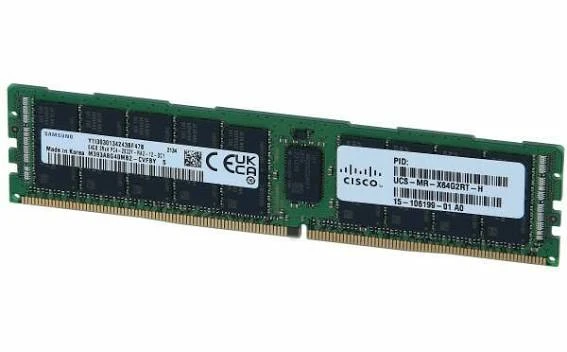
UCS-MR-X64G2RT-H (Cisco UCS Server Memory Module, 64GB DDR4, 2933MHz ECC RDIMM, 2Rx4 1.2V)
4.7 (7)- Server DRAM Module
- Server
- 64GB DDR4-2933-MHz RDIMM/2Rx4/1.2v
- UCS-MR-X64G2RT-H
- Cisco
- Cisco UCS M5
- Server
Est Value $1,856.25
$545.74
70.6% offIn stockNewRefurbishedFirst-Time Buyer Discount – Get up to 2% additional off on your first order
ORM Rewards Earn $50 in Rewards + Free Expedited Delivery – Join Now!
Use eCoupon ORMSAVE10
eCoupon limited to 5 units

ORM Sales Advisors
Buying for your business? Get a personalised quote in under 2 hours. Talk to an expert
LEARNFilters (1) 
Questions & Answers
What memory do Cisco UCS servers use?
UCS servers use Cisco-validated registered DIMMs (RDIMMs and LRDIMMs): DDR4 for M5 and M6 generations and DDR5 for M7 and newer, in capacities from 16GB up to 256GB per module.
Can I use third-party RAM in UCS servers?
Cisco supports only Cisco-qualified DIMMs, and unqualified memory can cause errors, failed diagnostics, and unsupported TAC cases. ORM Systems supplies genuine Cisco-coded modules to keep you fully supported.
How do I choose the right DIMM for my UCS server?
Match four factors: server generation (M5, M6, M7), DIMM type (RDIMM or LRDIMM), speed (such as 3200MHz DDR4 or 4800/5600MT/s DDR5), and capacity per the server's population rules.
What are UCS memory population rules?
DIMMs must be installed in specific slot orders, balanced across CPU channels, and matched in type per channel. Correct population maximizes bandwidth, while incorrect population reduces performance or prevents boot.
What is the difference between RDIMM and LRDIMM?
RDIMMs buffer command and address signals and suit most capacities. LRDIMMs buffer data lines too, enabling the highest per-DIMM capacities (128GB+) at maximum total memory configurations.
How much memory can a UCS server hold?
It varies by model. Popular servers like the C220 and C240 M6 support up to 32 DIMM slots and multiple terabytes of RAM, and M7 DDR5 platforms scale even higher.
Can I mix different DIMM sizes in a UCS server?
Mixing is allowed within Cisco's documented rules but should follow channel-balancing guidelines. Identical DIMMs per channel deliver the best, most predictable performance.
Does adding memory require downtime?
Yes. DIMMs are not hot-swappable, so schedule a maintenance window, follow ESD precautions, and verify the new memory in POST and UCS Manager or IMC after installation.