 United States
Networking Equipment Dell Compatible XFP
Engineered for high performance and seamless integration, our Dell Networking compatible XFP offers exceptional data throughput, robust reliability, and secure connectivity to empower enterprise networks effectively.
Talk to an expert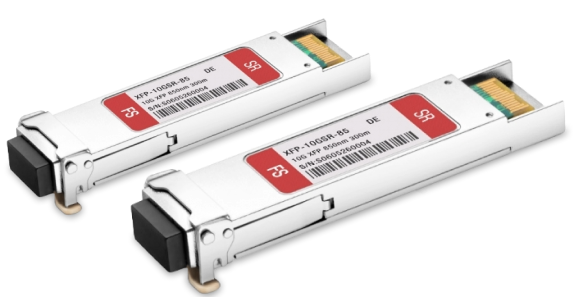
11 Matching results

407-10949-C (10GbE XFP Transceiver SR/SW Dell Compatible)
4.4 (5)- Transceiver
- Orm
- SFP+
- 10G
- LC
- 850nm
- Short-Range
Est Value In stock
First-Time Buyer Discount – Get up to 2% additional off on your first order
ORM Rewards Earn $50 in Rewards + Free Expedited Delivery – Join Now!
Use eCoupon ORMSAVE10
eCoupon limited to 5 units

407-10948-C (10GbE XFP Transceiver LR/LW 10KM Dell Compatible)
4.6 (5)- Transceiver
- Orm
- SFP
- 10G
- LC
- 1310nm
- Long-Range
Est Value In stockFirst-Time Buyer Discount – Get up to 2% additional off on your first order
ORM Rewards Earn $50 in Rewards + Free Expedited Delivery – Join Now!
Use eCoupon ORMSAVE10
eCoupon limited to 5 units

407-10947-C (10GbE XFP Transceiver ER/EW 40KM Dell Compatible)
4.4 (5)- Transceiver
- Orm
- SFP+
- 10G
- LC
- 850 nm
- Short-Range
Est Value In stockFirst-Time Buyer Discount – Get up to 2% additional off on your first order
ORM Rewards Earn $50 in Rewards + Free Expedited Delivery – Join Now!
Use eCoupon ORMSAVE10
eCoupon limited to 5 units

430-4528-C (10 GbE XFP optics module SR Dell Force10 Compatible)
4.6 (5)- Transceiver
- Orm
- SFP+
- 10G
- LC
- 850 nm
- Short-Range
Est Value In stockFirst-Time Buyer Discount – Get up to 2% additional off on your first order
ORM Rewards Earn $50 in Rewards + Free Expedited Delivery – Join Now!
Use eCoupon ORMSAVE10
eCoupon limited to 5 units

430-4529-C (10 GbE XFP optics module LR Dell Force10 Compatible)
4.8 (5)- Transceiver
- Orm
- SFP
- 10G
- LC
- 1310nm
- Short-Range
Est Value In stockFirst-Time Buyer Discount – Get up to 2% additional off on your first order
ORM Rewards Earn $50 in Rewards + Free Expedited Delivery – Join Now!
Use eCoupon ORMSAVE10
eCoupon limited to 5 units

430-4530-C (10 GbE XFP optics module ER Dell Force10 Compatible)
4.6 (5)- Transceiver
- Orm
- SFP+
- 10G
- LC
- 1310nm
- Long-Range
Est Value In stockFirst-Time Buyer Discount – Get up to 2% additional off on your first order
ORM Rewards Earn $50 in Rewards + Free Expedited Delivery – Join Now!
Use eCoupon ORMSAVE10
eCoupon limited to 5 units

430-4716-C (10GbE ZR/ZW XFP Optics Module 80km Dell Compatible)
4.6 (5)- Transceiver
- Orm
- SFP+
- 10G
- LC
- 850 nm
- Short-Range
Est Value In stockFirst-Time Buyer Discount – Get up to 2% additional off on your first order
ORM Rewards Earn $50 in Rewards + Free Expedited Delivery – Join Now!
Use eCoupon ORMSAVE10
eCoupon limited to 5 units

GP-XFP-1S-C (10 Gigabit Ethernet XFP optics module SR Dell Force10 Compatible)
4.6 (5)- Transceiver
- Orm
- XFP
- 10G
- LC
- 1310 nm
- Long-Range
Est Value In stockFirst-Time Buyer Discount – Get up to 2% additional off on your first order
ORM Rewards Earn $50 in Rewards + Free Expedited Delivery – Join Now!
Use eCoupon ORMSAVE10
eCoupon limited to 5 units

GP-XFP-1L-C (10 Gigabit Ethernet XFP optics module LR Dell Force10 Compatible)
4.2 (5)- Transceiver
- Orm
- XFP
- 10G
- LC
- 1310nm
- Long-Range
Est Value In stockFirst-Time Buyer Discount – Get up to 2% additional off on your first order
ORM Rewards Earn $50 in Rewards + Free Expedited Delivery – Join Now!
Use eCoupon ORMSAVE10
eCoupon limited to 5 units

GP-XFP-1E-C (10 Gigabit Ethernet XFP optics module ER Dell Force10 Compatible)
5 (5)- Transceiver
- Orm
- XFP
- 10G
- LC
- 1310nm
- Long-Range
Est Value In stockFirst-Time Buyer Discount – Get up to 2% additional off on your first order
ORM Rewards Earn $50 in Rewards + Free Expedited Delivery – Join Now!
Use eCoupon ORMSAVE10
eCoupon limited to 5 units

GP-XFP-1Z-C (10 Gigabit Ethernet XFP optics module ZR Dell Force10 Compatible)
5 (5)- Transceiver
- Orm
- XFP
- 10G
- LC
- 1310 nm
- Long-Range
Est Value In stockFirst-Time Buyer Discount – Get up to 2% additional off on your first order
ORM Rewards Earn $50 in Rewards + Free Expedited Delivery – Join Now!
Use eCoupon ORMSAVE10
eCoupon limited to 5 units

ORM Sales Advisors
Buying for your business? Get a personalised quote in under 2 hours. Talk to an expert
LEARNFilters (11) 
Questions & Answers
What is Dell Networking Compatible XFP?
The Dell Networking Compatible XFP is a 10 Gbps small form-factor pluggable transceiver module designed for Dell switches and routers, enabling flexible high-speed Ethernet connectivity over single-mode or multimode fiber.
Which Dell devices support Compatible XFP modules?
Compatible XFP modules are officially supported on Dell Networking N3000, N4000, N1500 and S4810 switch series, as well as select M1000e and Z9500 chassis platforms.
What fiber types and distances does the Dell Compatible XFP support?
Dell Compatible XFP modules support multimode fiber up to 300 meters (850 nm) and single-mode fiber up to 80 km (1310 nm), depending on the selected wavelength and optical budget.
How do I install a Dell Networking Compatible XFP module?
To install, power down the port (if required), insert the XFP into the SFP+ slot until it clicks, then restore power; the switch auto-detects and initializes the module within seconds.
Can I mix Dell compatible and third-party XFP modules?
While third-party XFP modules may physically fit, only Dell-certified Compatible XFPs guarantee full interoperability and firmware support across Dell switch families.
What is the typical power consumption of a Dell Networking XFP?
Dell Compatible XFP modules draw approximately 1.5 W under normal operation, helping maintain low-power budgets in high-density 10 GbE deployments.
Are Dell Compatible XFPs hot-swappable?
Yes, Dell Networking Compatible XFP modules are fully hot-swappable, allowing you to install or replace them without powering down the switch or affecting active traffic.
How can I verify Dell XFP module compatibility?
Consult the latest Dell Networking Technical Specifications Guide or use Dell’s online compatibility matrix to confirm your switch model supports the specific XFP part number.
What warranty covers Dell Networking Compatible XFP modules?
Dell offers a limited lifetime warranty on all certified Compatible XFP modules, covering defects in materials and workmanship for the life of the product in service.
How do I troubleshoot link issues with a Dell XFP?
Check fiber cleanliness, verify SFP+ slot configuration, confirm matching data rate and wavelength, then review switch logs for diagnostic error codes.
What part numbers correspond to Dell compatible XFPs?
Common Dell part numbers include 407-11221 (10GBASE-SR), 407-11222 (10GBASE-LR), and 407-11224 (10GBASE-ER) for multimode, single-mode, and extended-reach applications.
Can Dell Compatible XFP modules be used in non-Dell switches?
Dell Certified XFP modules are optimized for Dell hardware; compatibility with other vendors is not guaranteed and may void third-party support agreements.
What environmental specifications apply to Dell XFPs?
Dell Compatible XFP modules operate between 0 °C and 70 °C (32 °F–158 °F) with relative humidity from 5 % to 95 %, non-condensing, for standard data center environments.
How does Dell Compatible XFP differ from SFP+?
Unlike SFP+ which is limited to 10 Gbps, XFP supports 10 Gbps with more robust dispersion compensation, making it ideal for longer-reach single-mode fiber links.
Where can I purchase genuine Dell Networking Compatible XFP modules?
You can purchase certified Dell Compatible XFPs from Dell’s official online store, authorized Dell resellers or Dell Premier Partners to ensure authenticity and warranty coverage.